




Start here
Where are you in your journey?
Choose the path that fits today. We’ll take you to the most useful discussions.
- GLP-1 medication Zepbound, Wegovy, access, side effects, progress, and support.
- Before surgery Compare procedures, plan ahead, and get honest pre-op answers.
- Post-op Recovery, food stages, symptoms, and support.
- Long-term Regain, labs, habits, and life after the honeymoon.
- Revision Explore revision options, complications, and next steps.
6 months! -95lbs and 73% to goal!
- Replies 20
- Views 2.8k
- Created
- Last Reply
Featured Replies
Archived
This topic is now archived and is closed to further replies.
Hello everyone! Sorry for the undies but wanted to drop a progress pic to Celebrate my 6 month surgiversary!
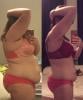


(the plan was to wear the same clothes but the bra is too big to stay on anymore... I'm not complaining haha)
5'11"
HW: 300.0 (3/29/16)
SW: 278.4 (8/1/16)
CW: 204.5 (2/1/17)
GW: 170
Down 95.5 total, 73.9 since surgery
I was hoping I'd hit 100lbs lost/onederland by 6 months but I've been in what hopefully is just a stall for the past 3 weeks... the holidays were a struggle and I think that belatedly set me back a bit but I'm back on track so should see it moving again soon
As for actual measurements, I forgot to take them at my highest weight or surgery weight so my first set of measurements is from 8/25 (262lbs) but I've lost at least 6in from the smallest part of my waist, 5 from my navel, 7 from my hips, and then 2-4 inches everywhere else.
Still struggling to consistently get enough Protein and avoiding carbs but it's a work in progress!
Here's to losing the last 35lbs (or more!) before my 1 year surgiversary
Edited by elliekay