Skip to content
View in the app

A better way to browse. Learn more.

BariatricPal

A full-screen app on your home screen with push notifications, badges and more.

To install this app on iOS and iPadOS
  1. Tap the Share icon in Safari
  2. Scroll the menu and tap Add to Home Screen.
  3. Tap Add in the top-right corner.
To install this app on Android
  1. Tap the 3-dot menu (⋮) in the top-right corner of the browser.
  2. Tap Add to Home screen or Install app.
  3. Confirm by tapping Install.

100 pounds lost

  • Popular Post

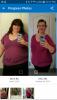
I had the DS on 6/22/16 and just wanted to share my progress. I started the preop diet on 6/8/16, so here is my pic 20 weeks later! If anyone is considering the DS or any other surgery, I hope this inspires, since others progress pictures really helped me stay motivated.post-269999-14776724188034_thumb.jpg
  • Replies 15
  • Views 2.2k
  • Created
  • Last Reply

Featured Replies

Congrats! thanks for posting - it is very inspirational

That is so AWESOME!!! Great weight loss too. KEEP ON KEEPING ON!!!

Wow! Congrats!

Sent from my iPhone using the BariatricPal App

Congratulations! Keep up your hard work!

Wow you look fantastic and such a change! Congratulations ;)

Congratulations! You can see the difference.

Wow!

Sent from my iPhone using the BariatricPal App

  • 1 month later...

@@Loudy227, girl you look great! Thanks for sharing! Keep up the good work!

  • 2 months later...

Archived

This topic is now archived and is closed to further replies.

Trending Products

PatchAid Vitamin Patches

Account

Navigation

Search

Search

Configure browser push notifications

Chrome (Android)
  1. Tap the lock icon next to the address bar.
  2. Tap Permissions → Notifications.
  3. Adjust your preference.
Chrome (Desktop)
  1. Click the padlock icon in the address bar.
  2. Select Site settings.
  3. Find Notifications and adjust your preference.