




Skip to content
View in the app

A better way to browse. Learn more.

BariatricPal

A full-screen app on your home screen with push notifications, badges and more.

To install this app on iOS and iPadOS
  1. Tap the Share icon in Safari
  2. Scroll the menu and tap Add to Home Screen.
  3. Tap Add in the top-right corner.
To install this app on Android
  1. Tap the 3-dot menu (⋮) in the top-right corner of the browser.
  2. Tap Add to Home screen or Install app.
  3. Confirm by tapping Install.

Join BariatricPal free

  • Ask your own questions
  • Reply and follow topics
  • Message other members
  • No cost, no spam

One Year Post-op

  • Popular Post

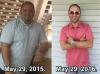
Hello everyone, today I made my one year post op anniversary. Having surgery was the best decision I made in my life.

HW 340

SW 320

CW 195

GW ( happy where I am ) post-244766-1464549767437_thumb.jpg
  • Replies 8
  • Views 1.3k
  • Created
  • Last Reply

Featured Replies

Wow. Congrats! I can't wait to be one year post-op. 2 months a a week so far. any tips for the maintenance phase? what are your main challenges?

  • Author

Thank you. My main challenges always come from being invited to dinner functions and being cautious on what to eat especially now that summer is here.

I have to go out for dinners a lot too with my job and this is a real challenge at my current stage.

I guess at one year out, you can probably eat a bit more, and therefore you must be careful with what to choose to stay on track. But it seems it is working for you. :)

  • Author

I keep my eating out to simple things. Mostly Chicken and vegetables. It's definitely hard when no one knows you had surgery.

Outstanding !!!!!!!!!!!!!!!!!!

  • Author

Thank you [emoji106]????

Archived

This topic is now archived and is closed to further replies.

Account

Navigation

Search

Search

Configure browser push notifications

Chrome (Android)
  1. Tap the lock icon next to the address bar.
  2. Tap Permissions → Notifications.
  3. Adjust your preference.
Chrome (Desktop)
  1. Click the padlock icon in the address bar.
  2. Select Site settings.
  3. Find Notifications and adjust your preference.