Start here
Where are you in your journey?
Choose the path that fits today. We’ll take you to the most useful discussions.
- GLP-1 medication Zepbound, Wegovy, access, side effects, progress, and support.
- Before surgery Compare procedures, plan ahead, and get honest pre-op answers.
- Post-op Recovery, food stages, symptoms, and support.
- Long-term Regain, labs, habits, and life after the honeymoon.
- Revision Explore revision options, complications, and next steps.
Dreamsicle Jellotein
- Replies 5
- Views 4.5k
- Created
- Last Reply
Featured Replies
Archived
This topic is now archived and is closed to further replies.
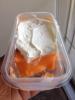
I found a recipe for adding protein to Jello and I've come up with some really good mixes but this one is my favorite. I'm on my preop liquid diet and my doctor said this was fine and would probably be fine post op as well.
You will need
Sugar-free Orange Jello mix
Water
Vanilla Protein Powder (I used Quest Vanilla Milkshake)
Fat-Free (sugar free if you can find it) cool whip or whipped topping (optional)
Prepare Jello as instructed on box. Whisk gelatin completely. Add 2 scoops of protein powder and whisk thoroughly. The mix will thicken and look a bit milky. Don't whisk it so much that it's foamy. The protein will separate. Pour into container or individual containers for small servings. Refrigerate until set (I let mine set overnight). Top with a small spoonful of whipped topping when serving or eating (again, optional).
Tastes just like that classic Popsicle without the sugar .
.
I don't wanna give the macros on this because your protein might be different than mine.