Skip to content
View in the app

A better way to browse. Learn more.

BariatricPal

A full-screen app on your home screen with push notifications, badges and more.

To install this app on iOS and iPadOS
  1. Tap the Share icon in Safari
  2. Scroll the menu and tap Add to Home Screen.
  3. Tap Add in the top-right corner.
To install this app on Android
  1. Tap the 3-dot menu (⋮) in the top-right corner of the browser.
  2. Tap Add to Home screen or Install app.
  3. Confirm by tapping Install.
  • Cart

The New Normal

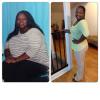
Loving the new me!

post-176935-0-83659400-1386640606_thumb.jpg

  • Replies 33
  • Views 3.3k
  • Created
  • Last Reply

Featured Replies

Wow!

Congratulations!! That is a wonderful achievement!

Awesome! good job

You look amazing!!

You look amazing!!!

WOW!! awesome

You look amazing. Great job! I have a** envy. How did you get your booty so high?! I can't get mine off the back of my thighs!

  • Author

Thanks everyone! I clinch my butt all day to try to keep the muscles firm. Maybe it's working!

You look fabulous!

Loving the new me!

Linda

what a lovely smile you have in the picture on the left :)

Who is the chic on the right???

What????

did you say that is you too!!!

OMG :o

you look magnificent!!!!

keeping that lovely smile too :)

no ticker :angry:

between you and me ;)

what was your starting and current weight???

amazing transformation

continued good luck for the rest of your healthier, happier, longer life

kathy

congrats

Edited by proudgrammy

You look amazing. Great job! I have a** envy. How did you get your booty so high?! I can't get mine off the back of my thighs!

LOLOLOLOLOLOLOLOL...

Beautiful before and beautiful after! I hope you feel as awesome as you look!

Archived

This topic is now archived and is closed to further replies.

Trending Products

PatchAid Vitamin Patches

Account

Navigation

Search

Search

Configure browser push notifications

Chrome (Android)
  1. Tap the lock icon next to the address bar.
  2. Tap Permissions → Notifications.
  3. Adjust your preference.
Chrome (Desktop)
  1. Click the padlock icon in the address bar.
  2. Select Site settings.
  3. Find Notifications and adjust your preference.