




Start here
Where are you in your journey?
Choose the path that fits today. We’ll take you to the most useful discussions.
- GLP-1 medication Zepbound, Wegovy, access, side effects, progress, and support.
- Before surgery Compare procedures, plan ahead, and get honest pre-op answers.
- Post-op Recovery, food stages, symptoms, and support.
- Long-term Regain, labs, habits, and life after the honeymoon.
- Revision Explore revision options, complications, and next steps.
- Replies 16
- Views 1.4k
- Created
- Last Reply
Top Posters In This Topic
-
Lebim 5 posts
-
atcgoddess1 1 post
-
georgiagirl 1 post



Popular Days
Most Popular Posts
-
And for anyone who would like some inspiration, here are some pictures of his success. I'm very proud of him :] he went from 360lbs to 150lbs in under a year [ATTACH]411[/ATTACH] [ATTACH

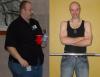
So this will probably sound dumb but as some of you know (since I've mentioned it a million times) I have a brother who also had the RNY and was rather successful. He's a huge proponent of the surgery and on many support groups (not this one though) and was just wondering if anyone here may know him? He goes by noble or noble1 on the internet and his name is james or JD. just curious