




Skip to content
View in the app

A better way to browse. Learn more.

BariatricPal

A full-screen app on your home screen with push notifications, badges and more.

To install this app on iOS and iPadOS
  1. Tap the Share icon in Safari
  2. Scroll the menu and tap Add to Home Screen.
  3. Tap Add in the top-right corner.
To install this app on Android
  1. Tap the 3-dot menu (⋮) in the top-right corner of the browser.
  2. Tap Add to Home screen or Install app.
  3. Confirm by tapping Install.

Join BariatricPal free

  • Ask your own questions
  • Reply and follow topics
  • Message other members
  • No cost, no spam

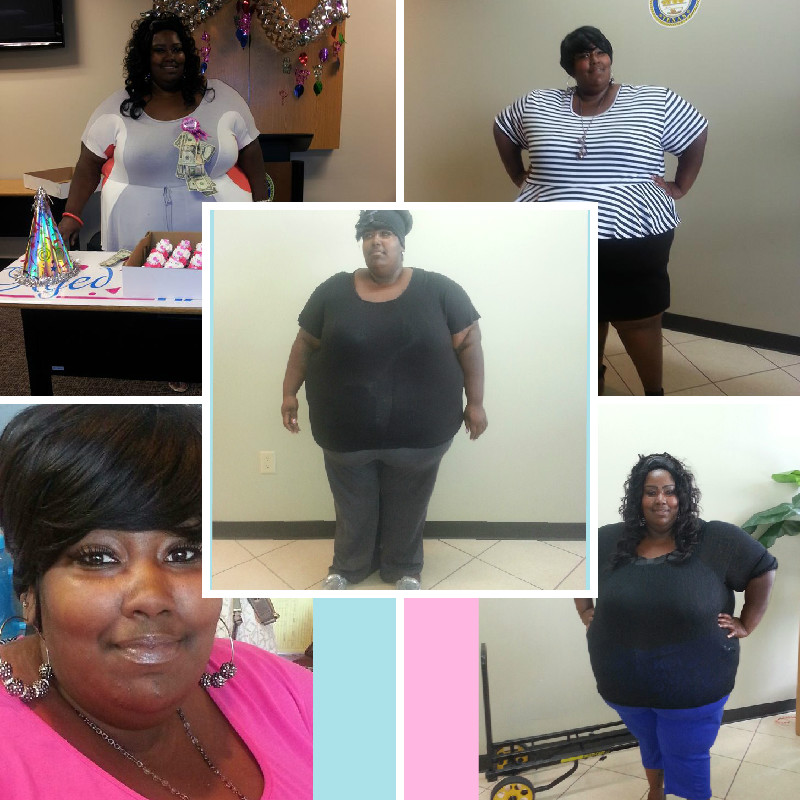
Im not where I need 2 be BUT Im not where I use 2 be

post-56129-13813669248049_thumb.jpg
  • Replies 9
  • Views 695
  • Created
  • Last Reply

Featured Replies

The important thing is your headed in the right direction. I think you have done great so far!!

  • Author

Thank u so much, im tryin 2 get there...but I had to realize THIS is MY race and as long as I get to the end it don't matter how long it takes!

Thank u so much, im tryin 2 get there...but I had to realize THIS is MY race and as long as I get to the end it don't matter how long it takes!

You are so right, this is our individual races and foward movement is much better than staying where we started!

Congrats on your success so far!

post-13655-13813658496754_thumb.jpg

One day at a time... You are doing so great! Looking GOOD!!

You are doing great, congrats on your success!!

Great job and attitude!

Sent from my iPhone using VST

Thank u so much, im tryin 2 get there...but I had to realize THIS is MY race and as long as I get to the end it don't matter how long it takes!

Very nice pictures! Congrats on your weight loss so far!!! And I love that name...neverbethesameagain...that's right...no turning back!!!! God bless you on your journey!!

Way to go!!! Keep up the positive attitude and keep rocking that sleeve!!!!

Congrats!!!

Good job..

Archived

This topic is now archived and is closed to further replies.

Account

Navigation

Search

Search

Configure browser push notifications

Chrome (Android)
  1. Tap the lock icon next to the address bar.
  2. Tap Permissions → Notifications.
  3. Adjust your preference.
Chrome (Desktop)
  1. Click the padlock icon in the address bar.
  2. Select Site settings.
  3. Find Notifications and adjust your preference.