




Skip to content
View in the app

A better way to browse. Learn more.

BariatricPal

A full-screen app on your home screen with push notifications, badges and more.

To install this app on iOS and iPadOS
  1. Tap the Share icon in Safari
  2. Scroll the menu and tap Add to Home Screen.
  3. Tap Add in the top-right corner.
To install this app on Android
  1. Tap the 3-dot menu (⋮) in the top-right corner of the browser.
  2. Tap Add to Home screen or Install app.
  3. Confirm by tapping Install.

Join BariatricPal free

  • Ask your own questions
  • Reply and follow topics
  • Message other members
  • No cost, no spam

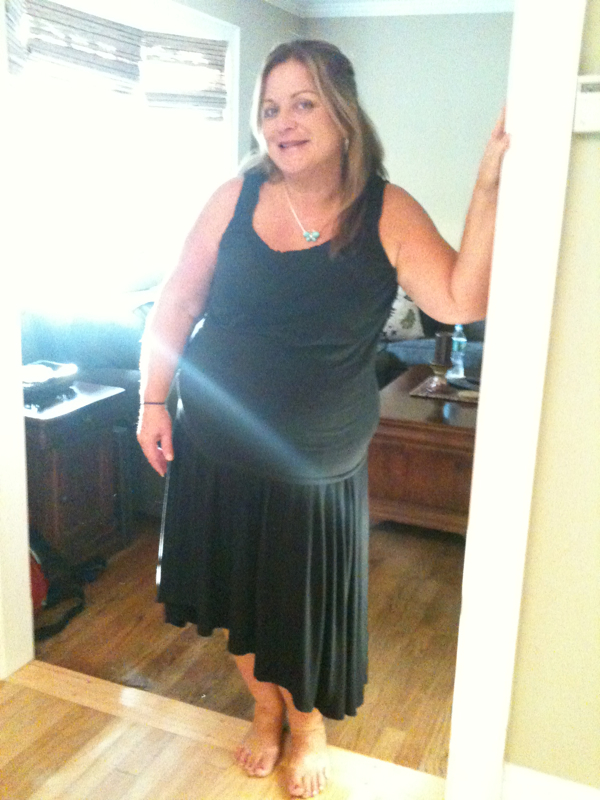
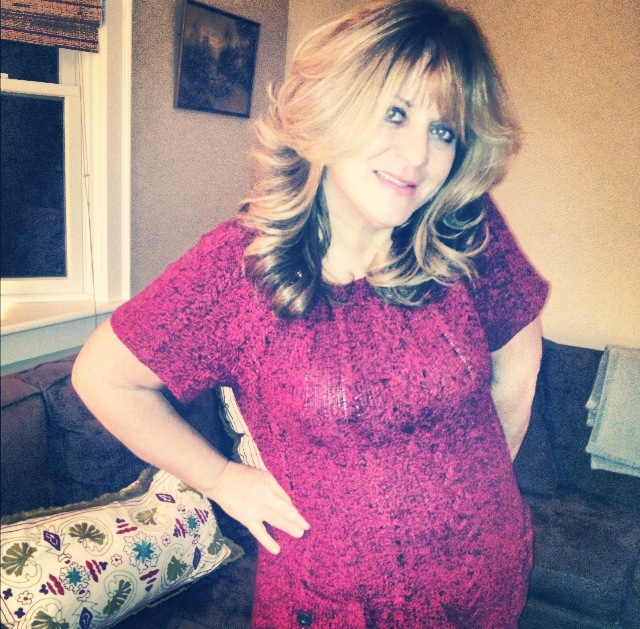
Before/After Photos- Aug. 2012 and Dec. 2012

post-38946-13813661357223_thumb.jpg

post-38946-13813661357792_thumb.jpg

  • Replies 8
  • Views 1k
  • Created
  • Last Reply

Featured Replies

  • Author

1st photo was in 8/15/12- start of Pre-op diet (weight 278). 2nd photo was this morning - 7 weeks post-op (weight 222). I'm baaaaaack!!!

Wow you look great!

You look Fabulous!!!:D

Wow!! You look amazing and gorgeous! I LOVE your hair! How are you feeling? Are you having any loose skin issues? You look like you lost a lot so far!

You look great,

you slimmed down Holly,

'tis the season

to be jolly!

:D

Good work and congratulations!

  • Author

Thanks, girls! I feel great! Aside from being verrry tired at night-I would forget I had WLS! Oh, the burping reminds me too! Lol-when I'm hungry, or full...my new tummy speaks to me! Working in an Elem. School office is exhausting -let alone 2 teenage daughters (17&18), I'm doing terrific! I feel younger than my age (53!!), which is a complete 180 degree turn from a year ago! I'm so happy my sleeve saved my life and is giving me me "mo-Jo" back! Tee-hee!

  • Author
You look great' date='

you slimmed down Holly,

'tis the season

to be jolly!

:D

Good work and congratulations![/quote']

Sorry gman! Your post crossed in the mail! Didn't mean to refer to you as a lady! ;) by the way, my start weight was 278 -I don't know why the smiley replaced the "8"!

Congratulations!

Archived

This topic is now archived and is closed to further replies.

Account

Navigation

Search

Search

Configure browser push notifications

Chrome (Android)
  1. Tap the lock icon next to the address bar.
  2. Tap Permissions → Notifications.
  3. Adjust your preference.
Chrome (Desktop)
  1. Click the padlock icon in the address bar.
  2. Select Site settings.
  3. Find Notifications and adjust your preference.