Skip to content
View in the app

A better way to browse. Learn more.

BariatricPal

A full-screen app on your home screen with push notifications, badges and more.

To install this app on iOS and iPadOS
  1. Tap the Share icon in Safari
  2. Scroll the menu and tap Add to Home Screen.
  3. Tap Add in the top-right corner.
To install this app on Android
  1. Tap the 3-dot menu (⋮) in the top-right corner of the browser.
  2. Tap Add to Home screen or Install app.
  3. Confirm by tapping Install.

Join BariatricPal free

  • Ask your own questions
  • Reply and follow topics
  • Message other members
  • No cost, no spam

The New LBT is SO SLOW to me....

The new forum loads so super slowly for me.

Am I the only one with this problem? The old forum loaded up much faster. The new one is so slow that I hate to even bother with it anymore:(

  • Replies 18
  • Views 3.7k
  • Created
  • Last Reply

Top Posters In This Topic

Posted Images

Featured Replies

this site is getting so aggravating, very slow, i did switch to the mobile version and seemed to work better, boring colors..lol....i will switch back today and down lowd ad blocker to firefox and see if that works.. but right now very slow and frustrating ...

thanks cliff

We added new hardware and implemented a new content delivery system last night. This new content delivery system should speed things up immensely by loading our site from a server close to your location. Please let me know if you're receiving a better load time on pages.

Our content is being delivered out the following cities:

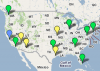
North America:

IMG_0103 (Small) (Small).JPG

  • Seattle
  • San Jose
  • San Francisco
  • Los Angeles
  • Las Vegas
  • Phoenix
  • Kansas City
  • Fort Worth
  • Houston
  • Chicago
  • New York
  • Washington D.C.
  • Virginia
  • Atlanta
  • Miami
  • Dallas

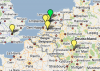
Europe:

3 mos later (1) (Small) (Small).jpg

  • Amsterdam
  • London
  • Frankfurt

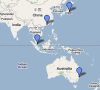
Asia / Pacific:

3 mos later (Small) (Small).jpg

  • Hong Kong
  • Singapore
  • Sydney, Australia
  • Tokyo

1.png

2.png

3.png

Join the conversation

You can post now and register later. If you have an account, sign in now to post with your account.

Guest
Reply to this topic...

Account

Navigation

Search

Search

Configure browser push notifications

Chrome (Android)
  1. Tap the lock icon next to the address bar.
  2. Tap Permissions → Notifications.
  3. Adjust your preference.
Chrome (Desktop)
  1. Click the padlock icon in the address bar.
  2. Select Site settings.
  3. Find Notifications and adjust your preference.