




Start here
Where are you in your journey?
Choose the path that fits today. We’ll take you to the most useful discussions.
- GLP-1 medication Zepbound, Wegovy, access, side effects, progress, and support.
- Before surgery Compare procedures, plan ahead, and get honest pre-op answers.
- Post-op Recovery, food stages, symptoms, and support.
- Long-term Regain, labs, habits, and life after the honeymoon.
- Revision Explore revision options, complications, and next steps.
Monthly weigh in and measurements
- Views 887
- Created
- Last Reply
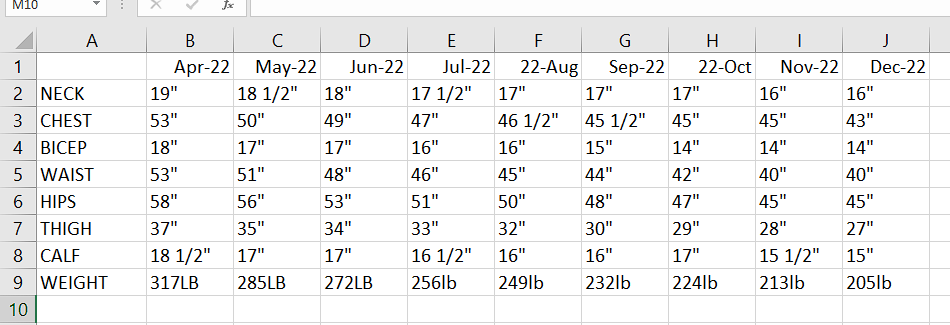
Its the 4th. Yall know the drill lol
Started at 317lb. April 18th was surgery. I was hoping to loose 5lb in the last 2 weeks but it did not happen. Probably another stall. Also probably didnt help i ate some junk food from where i work the last week. So need to adjust my eating a bit. get back to meal prepping. Been working a lot and just been eating what they serve where i work. Next two days i am off, Heading to the grocery store to pick up some food to make my meals with again.