




Start here
Where are you in your journey?
Choose the path that fits today. We’ll take you to the most useful discussions.
- GLP-1 medication Zepbound, Wegovy, access, side effects, progress, and support.
- Before surgery Compare procedures, plan ahead, and get honest pre-op answers.
- Post-op Recovery, food stages, symptoms, and support.
- Long-term Regain, labs, habits, and life after the honeymoon.
- Revision Explore revision options, complications, and next steps.
My Protein Bites Cookies available @ The BariatricPal Store!
- Views 917
- Created
- Last Reply
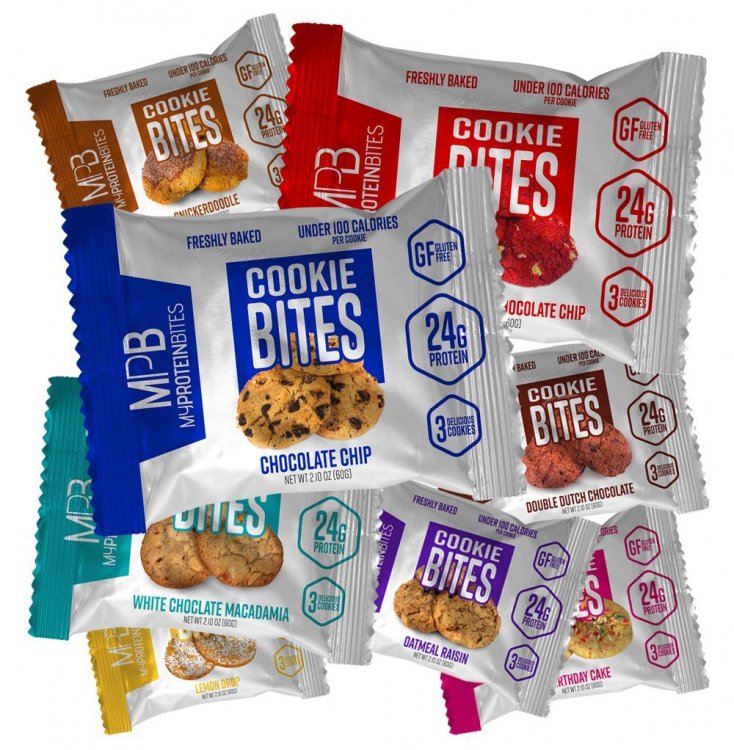
There’s nothing more satisfying than eating a fresh-baked protein cookie (or three). At Protein Bites , they want you to enjoy the unforgettable taste of protein cookies while staying healthy too. That’s why the Protein Bites Protein Cookies have been made. Each pack of fresh-baked cookies packs a whopping 24g of energizing protein and is sweetened with diabetic-friendly Stevia. The Protein Bites cookies are also trans-fat free and gluten-free—just a few more reasons to feel good about satisfying your protein needs. Buy a box of these protein cookies today!
Highlights:
You can view more information and purchase My Protein Bites Cookies @ The BariatricPal Store.