




Skip to content
View in the app

A better way to browse. Learn more.

BariatricPal

A full-screen app on your home screen with push notifications, badges and more.

To install this app on iOS and iPadOS
  1. Tap the Share icon in Safari
  2. Scroll the menu and tap Add to Home Screen.
  3. Tap Add in the top-right corner.
To install this app on Android
  1. Tap the 3-dot menu (⋮) in the top-right corner of the browser.
  2. Tap Add to Home screen or Install app.
  3. Confirm by tapping Install.

Join BariatricPal free

  • Ask your own questions
  • Reply and follow topics
  • Message other members
  • No cost, no spam

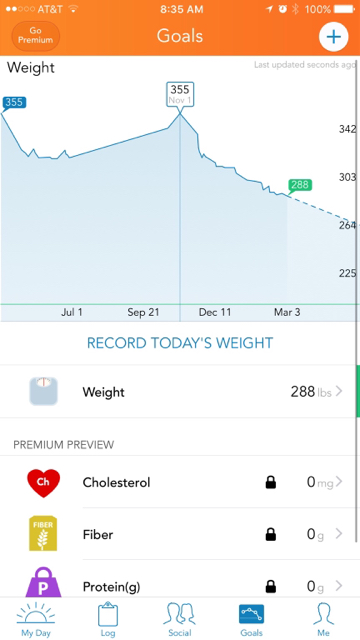
My weight loss charted since pre- op 50% to goal weight.

ImageUploadedByBariatricPal1490240854.740231.jpg

I weighed 355 (Nov '16)

Surgery weight 338

Current weight 283

(I didn't track very often before so I would disregard previous data points.)

But you can clearly see sudden drops, weight gains and stalls. Rarely matching my consistent dedication to my plan.

I know as I change my relationship with food and make good choices in each moment and day, the rest will take care of itself. Just not in a perfect line.

Sent from my iPhone using the BariatricPal AppImageUploadedByBariatricPal1490240642.904074.jpg
  • Replies 3
  • Views 582
  • Created
  • Last Reply

Featured Replies

Great Job!

Good job! By the way, what app is that?


Height: 5'0"
Weight for WLS consultation: 216 lbs.
Surgery date: 2/13/17
Goal: -71 lbs for healthy BMI (about 145 lbs).
Current weight: 180.8
My profile picture is not me. It's my "FITspiration" body.

  • Author
Good job! By the way, what app is that?


Height: 5'0"
Weight for WLS consultation: 216 lbs.
Surgery date: 2/13/17
Goal: -71 lbs for healthy BMI (about 145 lbs).
Current weight: 180.8
My profile picture is not me. It's my "FITspiration" body.

"Lose it"
It is what I use to track my weight, exercise, and all my food. Similar to my fitness pal


Sent from my iPhone using the BariatricPal App

Archived

This topic is now archived and is closed to further replies.

Account

Navigation

Search

Search

Configure browser push notifications

Chrome (Android)
  1. Tap the lock icon next to the address bar.
  2. Tap Permissions → Notifications.
  3. Adjust your preference.
Chrome (Desktop)
  1. Click the padlock icon in the address bar.
  2. Select Site settings.
  3. Find Notifications and adjust your preference.