




Skip to content
View in the app

A better way to browse. Learn more.

BariatricPal

A full-screen app on your home screen with push notifications, badges and more.

To install this app on iOS and iPadOS
  1. Tap the Share icon in Safari
  2. Scroll the menu and tap Add to Home Screen.
  3. Tap Add in the top-right corner.
To install this app on Android
  1. Tap the 3-dot menu (⋮) in the top-right corner of the browser.
  2. Tap Add to Home screen or Install app.
  3. Confirm by tapping Install.

Join BariatricPal free

  • Ask your own questions
  • Reply and follow topics
  • Message other members
  • No cost, no spam

Syntrax users, anybody try the Lemon Tea flavor?

I'm a big fan of Syntrax Fuzzy Navel flavor.

I've tried other flavors, Strawberry Kiwi tastes ok but doesn't mix as clear as FN. Grape was awful and I returned it. Yesterday I bought the Lemon Tea flavor, it mixes well but I can't figure out if I like the taste or not. Has anybody tried it and gotten used to it or liked it? I'm not sure if I'm having an issue with the look of it and maybe that's what throwing me off!? It looks like pond water. post-259662-14565033238932_thumb.jpg
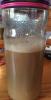
Edited by Susan66

  • Replies 4
  • Views 496
  • Created
  • Last Reply

Featured Replies

I liked the flavor OK, but only if I closed my eyes. I couldn't get over the color.

My latest discovery is to use the unflavored nectar, mix one scoop with half a crystal light packet, and about 10 oz. ice and Water. I'm now able to get all my Protein & water in everyday! I started using a SmartShake shaker and love it. Everything mixes up so much better.

I thought the lemon tea was awful.

Caribbean Cooler is still the best one. I plan on sipping it all summer and pretending I am on a beach.

I mix it in a sports bottle that you can't see through. Much better when you can't see it.

  • Author

So I'm not the only one who thinks the look of it makes the taste worse.[emoji4]

I will try the Caribbean Cooler next and also the unflavored mix.

Thanks friends [emoji4]

Edited by Susan66

Archived

This topic is now archived and is closed to further replies.

Account

Navigation

Search

Search

Configure browser push notifications

Chrome (Android)
  1. Tap the lock icon next to the address bar.
  2. Tap Permissions → Notifications.
  3. Adjust your preference.
Chrome (Desktop)
  1. Click the padlock icon in the address bar.
  2. Select Site settings.
  3. Find Notifications and adjust your preference.