Skip to content
View in the app

A better way to browse. Learn more.

BariatricPal

A full-screen app on your home screen with push notifications, badges and more.

To install this app on iOS and iPadOS
  1. Tap the Share icon in Safari
  2. Scroll the menu and tap Add to Home Screen.
  3. Tap Add in the top-right corner.
To install this app on Android
  1. Tap the 3-dot menu (⋮) in the top-right corner of the browser.
  2. Tap Add to Home screen or Install app.
  3. Confirm by tapping Install.

???? I DID IT ????

  • Popular Post

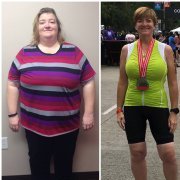
For the first time in 20 years I am now in the 200's and I have hit my first goal! I started at 364 and this just feels amazing. I am on cloud nine right now and want to celebrate.

  • Replies 18
  • Views 1.2k
  • Created
  • Last Reply

Featured Replies

Way to go, Karl!!

Edited by anaxila

I hope you do celebrate, you deserve it! Congratulations!

@@Karlnjax Congratulations!! I hope you do find a way to celebrate, you deserve it! Keep up the good work!! xo

Edited by Nikikins

Nice! Congratulations... Keep up the awesome work!

Congratulations on the major downsizing!

Excellent news.

Good luck, man.

Edited by Dub

Awesome!!!!!!!

Congratulations!!

For the first time in 20 years I am now in the 200's and I have hit my first goal! I started at 364 and this just feels amazing. I am on cloud nine right now and want to celebrate.

I cant wait I started at 363 currently at 315 16 pounds to go to 299 ..wish it would hurry up lol..Congrats

Archived

This topic is now archived and is closed to further replies.

Trending Products

PatchAid Vitamin Patches

Account

Navigation

Search

Search

Configure browser push notifications

Chrome (Android)
  1. Tap the lock icon next to the address bar.
  2. Tap Permissions → Notifications.
  3. Adjust your preference.
Chrome (Desktop)
  1. Click the padlock icon in the address bar.
  2. Select Site settings.
  3. Find Notifications and adjust your preference.