Skip to content
View in the app

A better way to browse. Learn more.

BariatricPal

A full-screen app on your home screen with push notifications, badges and more.

To install this app on iOS and iPadOS
  1. Tap the Share icon in Safari
  2. Scroll the menu and tap Add to Home Screen.
  3. Tap Add in the top-right corner.
To install this app on Android
  1. Tap the 3-dot menu (⋮) in the top-right corner of the browser.
  2. Tap Add to Home screen or Install app.
  3. Confirm by tapping Install.
  • Appearance

Join BariatricPal free

  • Ask your own questions
  • Reply and follow topics
  • Message other members
  • No cost, no spam

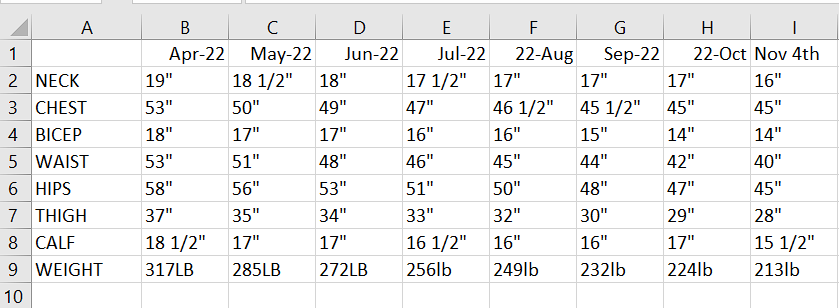
Monthly weigh in and measurements 7 months post op

  • Replies 4
  • Views 1.2k
  • Created
  • Last Reply

Top Posters In This Topic

Most Popular Posts

  • summerseeker
    summerseeker

    You know I love your stats day. You have now joined the 100lbs club and are smashing it. Huge congratulations are in order

  • Amazing!!! Do you only weigh in once a month, or do you only track it once a month? I'm still addicted to the scale, I'm afraid.

  • sweetsmith78
    sweetsmith78

    Wow congrats on the success! I’m a few years out and still step on the scale daily. Daily scale ways show only ounces or pound at a time . Not like your where you step on scale less and see the result
Posted Images

Featured Replies

Wow congrats on the success! I’m a few years out and still step on the scale daily. Daily scale ways show only ounces or pound at a time . Not like your where you step on scale less and see the results in bigger number.

  • Author
3 hours ago, Jeanniebug said:

Amazing!!!

Do you only weigh in once a month, or do you only track it once a month? I'm still addicted to the scale, I'm afraid.

I typically only weigh myself once a month. I may hop on the scale in the middle of the month if i think something is not right. but other than that i try my hardest to stay off the scale.

Join the conversation

You can post now and register later. If you have an account, sign in now to post with your account.

Guest
Reply to this topic...

Account

Navigation

Search

Search

Configure browser push notifications

Chrome (Android)
  1. Tap the lock icon next to the address bar.
  2. Tap Permissions → Notifications.
  3. Adjust your preference.
Chrome (Desktop)
  1. Click the padlock icon in the address bar.
  2. Select Site settings.
  3. Find Notifications and adjust your preference.