Skip to content
View in the app

A better way to browse. Learn more.

BariatricPal

A full-screen app on your home screen with push notifications, badges and more.

To install this app on iOS and iPadOS
  1. Tap the Share icon in Safari
  2. Scroll the menu and tap Add to Home Screen.
  3. Tap Add in the top-right corner.
To install this app on Android
  1. Tap the 3-dot menu (⋮) in the top-right corner of the browser.
  2. Tap Add to Home screen or Install app.
  3. Confirm by tapping Install.

Ten Months progresd

  • Replies 11
  • Views 1.2k
  • Created
  • Last Reply

Featured Replies

Congratulations! You look great.

Wow! Congrats on your super-success. Thanks for sharing your inspirational pics!

Good for you! looking great! Congrats.

3 hours ago, GwennyPenny said:

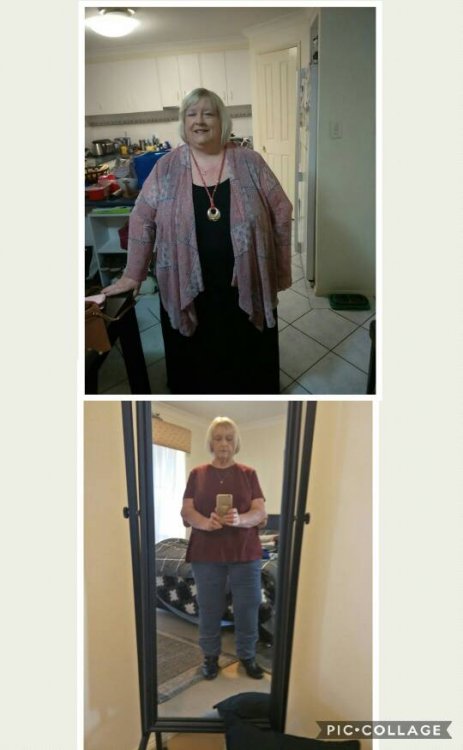
Ok so I'm taking the plunge. This is my first progress pic side by side. I had an RNY bypass in August 17 so 10 months and a bit before on my own. My start weight was 187kg and size 32. Now 87kg and size 16. 100kg lost feels pretty good. Next is skin!Collage%202018-07-03%2023_49_01.jpeg
Sent from my CPH1607 using BariatricPal mobile app

WOW! Great job, you look amazing. very encouraging...keep up the good work :)

Congratulations GwennyPenny, I currently look like your BEFORE with strawberry blonde hair. It is most sincere wish to someday look like your AFTER and you,inspire me to stay the course until,mine happens for good also. Thank,you for your visual testimony, you look. truly fine.??

Look at you! Congratulations you look great!

  • Author
Congratulations GwennyPenny, I currently look like your BEFORE with strawberry blonde hair. It is most sincere wish to someday look like your AFTER and you,inspire me to stay the course until,mine happens for good also. Thank,you for your visual testimony, you look. truly fine.[emoji119][emoji14]
Thank you. Good luck with your journey. I still have about 20lbs to go so maybe we can inspire each other!

Sent from my CPH1607 using BariatricPal mobile app

Archived

This topic is now archived and is closed to further replies.

Trending Products

PatchAid Vitamin Patches

Account

Navigation

Search

Search

Configure browser push notifications

Chrome (Android)
  1. Tap the lock icon next to the address bar.
  2. Tap Permissions → Notifications.
  3. Adjust your preference.
Chrome (Desktop)
  1. Click the padlock icon in the address bar.
  2. Select Site settings.
  3. Find Notifications and adjust your preference.