Skip to content
View in the app

A better way to browse. Learn more.

BariatricPal

A full-screen app on your home screen with push notifications, badges and more.

To install this app on iOS and iPadOS
  1. Tap the Share icon in Safari
  2. Scroll the menu and tap Add to Home Screen.
  3. Tap Add in the top-right corner.
To install this app on Android
  1. Tap the 3-dot menu (⋮) in the top-right corner of the browser.
  2. Tap Add to Home screen or Install app.
  3. Confirm by tapping Install.
  • Appearance

Join BariatricPal free

  • Ask your own questions
  • Reply and follow topics
  • Message other members
  • No cost, no spam

HIT MY FIRST GOAL! DOWN 60 lbs!

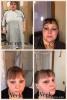
Today I hit my first goal I'm down 60 lbs since pre op diet started 11/8/16!!! I HAVE A NECK !!! post-296953-1484158729555_thumb.jpg THANKS TO ALL THE VETS FOR POSTING ADVICE THAT I FOLLOW!!

HW 289 CW 230 bypass 11/22/16

  • Replies 8
  • Views 566
  • Created
  • Last Reply

Top Posters In This Topic

Most Popular Posts

  • Congrats! That is huge progress in such a short amount of time!

  • Thanks so much! I know my dr said between 8 and 14 lbs shld come off a month I'm loosing around 25 a month but I went back to work 3 days post op and I'm constantly on the go from like 530 am till 10

Posted Images

Featured Replies

  • Author

Thanks so much! I know my dr said between 8 and 14 lbs shld come off a month I'm loosing around 25 a month but I went back to work 3 days post op and I'm constantly on the go from like 530 am till 10 pm. As I run a daycare and have three kids of my own. and I do a half hr cardio a day and lift weights and sit ups 5 times a week. I got to the dr again soon I'm hoping it's okay that I'm loosing more then they want. But I'm getting in my Protein and my fluids and getting about 800 calories a day. Which they told me between 6&8 hundred. I have so much more energy. And feel amazing!!!

HW 289 CW 230 bypass 11/22/16

Join the conversation

You can post now and register later. If you have an account, sign in now to post with your account.

Guest
Reply to this topic...

Account

Navigation

Search

Search

Configure browser push notifications

Chrome (Android)
  1. Tap the lock icon next to the address bar.
  2. Tap Permissions → Notifications.
  3. Adjust your preference.
Chrome (Desktop)
  1. Click the padlock icon in the address bar.
  2. Select Site settings.
  3. Find Notifications and adjust your preference.