Skip to content
View in the app

A better way to browse. Learn more.

BariatricPal

A full-screen app on your home screen with push notifications, badges and more.

To install this app on iOS and iPadOS
  1. Tap the Share icon in Safari
  2. Scroll the menu and tap Add to Home Screen.
  3. Tap Add in the top-right corner.
To install this app on Android
  1. Tap the 3-dot menu (⋮) in the top-right corner of the browser.
  2. Tap Add to Home screen or Install app.
  3. Confirm by tapping Install.
  • Appearance

Join BariatricPal free

  • Ask your own questions
  • Reply and follow topics
  • Message other members
  • No cost, no spam

I've become a pict ho

  • Replies 4
  • Views 979
  • Created
  • Last Reply

Top Posters In This Topic

Most Popular Posts

  • Crap. I typed "picture", then thought I changed it to "pic". LOL.

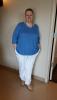
  • @@Sharon1964 wonderful transformation you have come soooo far 134 lbs down, down, down and dirty!!! more to get rid of?? sure - but your glass is half full you look wonderful in in your pi

  • WLSResources/ClothingExch
    WLSResources/ClothingExch

    I thought they'd died out. Live and learn. Great photo. I can see why they'd go for you.
Posted Images

Featured Replies

Today.

@@Sharon1964

wonderful transformation :)

you have come soooo far

134 lbs down, down, down and dirty!!!

more to get rid of??

sure - but your glass is half full

you look wonderful in in your pic

light blue is very becoming on you

hoarding the camera

better than running away

i'm sure you shine in all pics now

i have to put on my sunglasses!!!

keep up the wonderful job

day by day - 1 lb lb at a time

see you around the neighborhood

i'm buying first rounds of drinks

Water of course :rolleyes:

good luck

kathy

Join the conversation

You can post now and register later. If you have an account, sign in now to post with your account.

Guest
Reply to this topic...

Account

Navigation

Search

Search

Configure browser push notifications

Chrome (Android)
  1. Tap the lock icon next to the address bar.
  2. Tap Permissions → Notifications.
  3. Adjust your preference.
Chrome (Desktop)
  1. Click the padlock icon in the address bar.
  2. Select Site settings.
  3. Find Notifications and adjust your preference.