Skip to content
View in the app

A better way to browse. Learn more.

BariatricPal

A full-screen app on your home screen with push notifications, badges and more.

To install this app on iOS and iPadOS
  1. Tap the Share icon in Safari
  2. Scroll the menu and tap Add to Home Screen.
  3. Tap Add in the top-right corner.
To install this app on Android
  1. Tap the 3-dot menu (⋮) in the top-right corner of the browser.
  2. Tap Add to Home screen or Install app.
  3. Confirm by tapping Install.

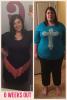
6 week post-op Pic

  • Popular Post

Scale hasn't moved all week so I decided to take a picture in a new dress that came in the mail today to compare to a before pic. The before picture was taken the night before surgery 6 weeks ago! My non scale victory!!

post-32402-14429767912592_thumb.jpg

  • Replies 18
  • Views 1.2k
  • Created
  • Last Reply

Featured Replies

Congrats Sam! Looking good!

It is amazing how much we change with loss. I'm about the same time out from my surgery as you now and I can wear clothes I haven't fit in in years! So glad I kept all of them :)

Congrats! It only get's better from here.

Congratulations! You can really see the difference! It gets so much better! Shopping will be so much fun!!!

Great progress! :)

Nice NSV Sam... looking great :)

Great job! Keep it up! You look so much happier too.

Way-2-go! The scale can be our best friend and it can be not so friendly at the same time. Don't let it get you down. Celebrate the victories; they'll be many more to come! Oh yeah, I hope you're not too attached to that new dress; you won't be able to wear it long...

  • Author

It has to be the same outfit or similar clothes... I am sorry, I cannot tell. Not being mean... just truthful

Same clothes or not, I can tell in my face! I'm proud of myself for that alone!

Thanks everyone!

Congrats!

Archived

This topic is now archived and is closed to further replies.

Trending Products

PatchAid Vitamin Patches

Account

Navigation

Search

Search

Configure browser push notifications

Chrome (Android)
  1. Tap the lock icon next to the address bar.
  2. Tap Permissions → Notifications.
  3. Adjust your preference.
Chrome (Desktop)
  1. Click the padlock icon in the address bar.
  2. Select Site settings.
  3. Find Notifications and adjust your preference.