
livvsmum
Gastric Sleeve Patients
-
Joined
-
Last visited
Everything posted by livvsmum
-
I'm with you! That's why this is a journey! It's not a single effort then it's done. I'm 5 years post op and have gained 40 pounds due to a pregnancy that ended in mc at 15 weeks and struggling with the blues and lack of motivation while grieving that loss. We've got this! We still have the same "tool" we had when we lost weight the first time and we know what works! Let's get these extra pounds off for good!
-
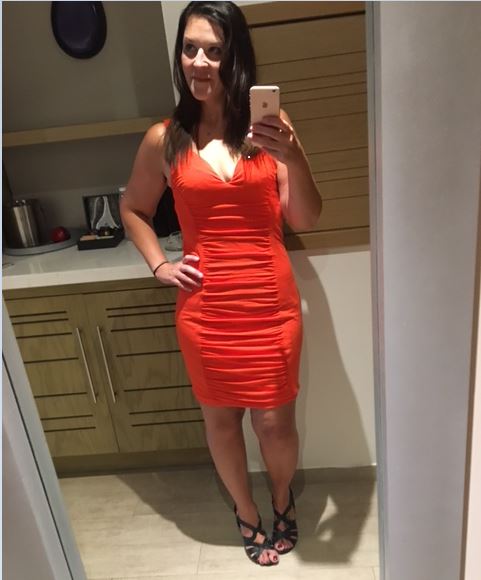
Wow! My 4 year surgiversary came and went this past week! I lost a total of 130 (136 pounds as of today) pounds, which puts me at 2 pounds above my lowest post-sleeve weight of 124 pounds, and I'm ok with that! I remember in the first 2years post op feeling like I was waiting for the other shoe to drop, for me to wake up one morning and have gained all the weight back. But I'm realizing now that I've maintained this new normal for 4 years. That is significant! That is not a fad; that is not a passing whim; that is a new normal. Do you know how I knew this for sure? I didn't even realize it had been 4 years since my surgery this month until someone else said something. I'm no longer counting the pounds lost (I actually needed a calculator for this post) and I'm no longer counting the months post op. In fact there are a lot of days I forget altogether that I had surgery. It's not that I'm not eating the bariatric diet or that I'm doing what I want. It's just a perspective change. I still use myfitness pal nearly every day to count my carbs and my protein and my water, but I know that this keeps me honest and accountable. I don't eat whatever I want. I probably never do. But I no longer avoid social settings where there might be food, I no longer stress if I have 18 peanut halves instead of 17. I no longer hate myself for wearing a 6 instead of a 4. It took a whole lot of freaking emotional work, 4 years of weekly therapy, and a lot of willingness to put in the time and energy to change. For those of you looking for some updated progress pics, here is me from a girls' week we just had in Mexico. I basically spent the week in a string bikni which is not something I ever thought I would do. Were there girls that looked way more amazing than I did? Hell yes! But they most likely did not birth 4 children or torture their bodies through ganing and losing 130 pounds. A body doesn't just forgive you for that. You live with the saggy skin in spots, with the stretchmarks on the otherwise flat stomach because that is life and not because you have failed. It is because you've lived, and struggled, and won, and left when you needed to leave, and stayed when you needed to stay, and you demanded more from yourself and you demanded better.


-
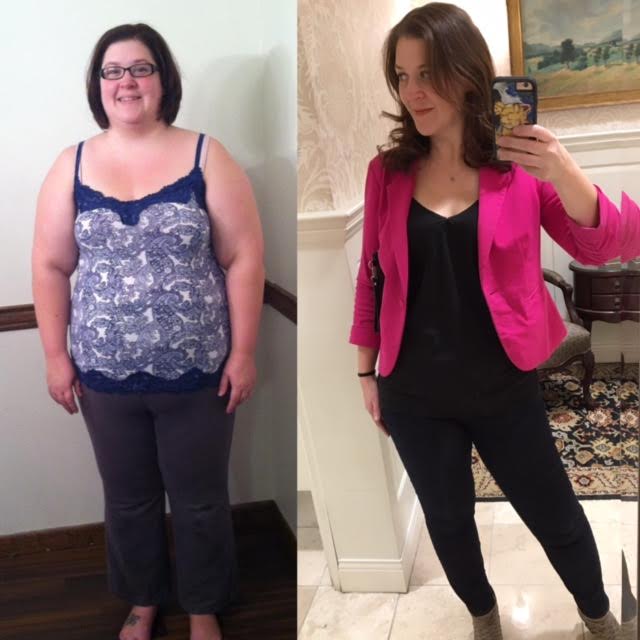
Today I had an "ah-ha" moment. It took 4 years, but I think I get it! It was triggered by this before photo popping up in my facebook memories from 5 years ago, (coupled with my most recent post-op photo taken last week, down 120 pounds since surgery in 2013). (attached below) ....And then reading the following quote on a friend's post: "Maybe the journey isn't so much about becoming anything. Maybe it's about unbecoming everything that isn't you so you can be who you were in the first place." I've struggled for years since losing the weight after surgery with questions of "is this the 'real' me, or am I just pretending and the 'real' 'fat' me will resurface sooner or later?" "Can people really change long-term?" It felt like the obese, sad, self-hating "me" was a monster waiting just below the surface to re-emerge. Give enough time and the right circumstances, the "real me" monster will rear it's head and I'll find myself back at nearly 300 pounds. Guys! I get it now! It's not about change. It's not about the "sticking power" of change. It's not about willpower or determination. It's not even about counting carbs, protein, calories, and ounces of water. Sure those are tools that help. But it's not about that. It's about doing the hard emotional work to figure out why I was hiding myself behind 150 excess pounds. It was about allowing myself to have a voice and using it. It was about demanding self-respect and respect from others. It was about leaving behind, painfully as it was in some cases, the toxic people in my life who emotionally damaged me. It was about processing the feelings that I didn't allow myself to feel for 18 years. Once I realized this, once I did this work, I could little by little shed the layers that hid who I was. I don't hate myself anymore. I'm not even angry at myself for letting myself get to be 300 pounds like I was when my journey started. I realize now that I was coping. I was doing the best I knew how to do at the time. I look at that person in the "before" picture below and I feel compassion because I know she did her best. I'm able now to let go the "fear" - and trust me, it's a literal fear - of that "real me" monster re-emerging from just below the surface. I can let it go because I realize, this is the real me. It was actually opposite. It was all the hiding I was doing under the emotional eating and the 150 excess pounds that was hiding the "real me." So I have to on some level disagree with those who say this is a process of change. Sure, you have to change your behavioral choices with food and exercise or none of this will work. But for me it was not "becoming a new person" or "changing" who I am as a person. For me it was about simply allowing myself to feel and allowing myself to return home to who I was before I was hurt and who the universe intends me to be. Feel free to check out my blog linked in my signature for more of my journey!
-
4/14- weight 158.4
-
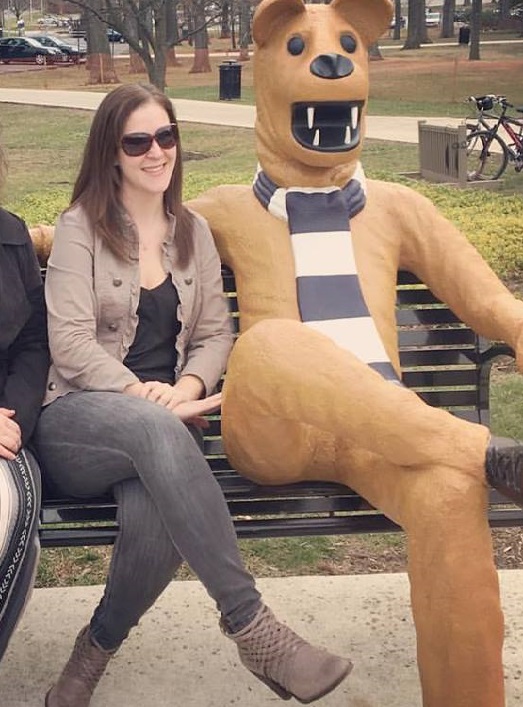
Well.....Happy New Year? I can't believe I haven't posted since December! This is the first time I've posted here in 2017! I guess as time goes on, you just kind of adjust to the new "normal" and it because less "new" if that makes sense. That's probably why you don't see as many people 3+ years post op on the online forums. You just kind of settle into the new routine and you don't have to work at it as much to maintain. Here are some recent pics. One is just me and the other two are with my daughter (I'm the one on the right in both). I also have lots of pictures before/after surgery and tummy tuck in my blog (themeiamnow.blogspot.com). So...where am I now? I am 3 years and 7 months post op. I have lost and maintained the loss of 128 pounds. I am up about 15 pounds from my lowest post op weight. The story on that.....I became extremely anemic and wasn't able to really exercise or watch what I ate. I was just in survival mode. So, I gained about 20 pounds back. After getting well, I lost about 5-9 of that regain (depending on the day and time of the month) and I realized something. I definitely could get back to my lowest post op weight. But it would be through the religious carb and Protein counting that I did right after surgery. For me, with my eating disordered brain, that is a dangerous way to live. It's way to easy to let that take control and become too obsessive if you have a history of anorexia in your past. So, through much therapy and taking control of my life situations I've realized something very important to my journey. I am enough just the way I am. I do not always have to struggle with my body and obsess over my weight. I eat mindfully and I generally watch my carb and protein intake, but I do not obsess over them. I've decided that I will stay right where I am. I have no desire to kill myself to maintain 120 pounds, when I can easily and comfortably maintain 135-140 without killing myself, eating somewhat "normally" and feeling good in my skin. So, I would say I've been in that range steadily for the past year and half with very little effort. To anyone starting out on the journey, I would say that the biggest contributor to my success (and I can say with confidence now that it IS a success) was dealing with the emotional eating and dealing with the underlying reasons that I was binge eating. Once I took care of that, I had no more reason to abuse my body with food. It was NOT easy. I had to be committed to make the difficult decisions to end the relationships that needed to end, to draw the boundaries that needed to be drawn, and to face some demons that were easier to just ignore. But I can honestly say, I'm entering a time in my life where I feel happier, freer, and healthier physically and emotionally than ever before!


-
Sorry! I'm a little late weighing in! Goal weight: 150 Current Weight: 159.8
-
Thanks for doing this! I came on here this morning specifically looking if there was a challenge I could join. With Spring in the air, I'm ready to shake of the winter blues and get refocused! :-)
-
I lost 150 pounds after the sleeve surgery. Then I encountered some health complications (not sleeve related) in 2016. I wasn't able to exercise, had no energy, and wasn't really watching what I was eating. Because of that I "rebounded" about 30 pounds. I went back to the weight management clinic because I wanted to stop it before I regained any more. The doctor gave me a prescription of phentermine, and it "jump started" my weight loss. I was able to stop the regain and shed about 10 pounds that I had regained. I will say though, that I think the benefit for me was mostly mental. After a couple months I realized I really didn't feel any differently on the phentermine than off of it. I went off of it at that pont and lost the rest of my regain by going back to the bariatric diet strictly. Hope that helps!
-
My insurance did approve and fully cover a panniculectomy and abdominoplasty at about 20 months post op. I was super pleased with the results. I called my ins ahead of time to find out the requirements, then once I had them all completed it was submitted and I had an approval 2 days later. I had to be 18+ months post op, have 4 months of PCP documentation of skin issues and other treatments tried, and have a surgeon submit photos. They did not, however, approve my arm lift. Good luck!
-
Check out my blog (themeiamnow.blogspot.com) there is lots of good info there about the whole process....the good, the bad, and the ugly. I tried to be as honest and straightforward as possible. It sounds like it might be a good option for you, but you have to feel comfortable with your decision. Let me know if you have questions and good luck to you!
-
Yes, for me things basically have returned to a "new" normal. I can drink Water normally. I can still only eat small portions, and bread will (hopefully) forever make me uncomfortable. I still have Protein shakes for Breakfast when I am in a hurry. So, yes and no. Things do settle down into "normal," but the "normal" is a new normal. I can eat pretty much anything, and there are people I know from work who met me after I lost the majority of the weight and don't know I had surgery. I do eat smaller portions and opt for the veggies and protein at work/group/social meals, but it basically looks like anyone "on a diet" or watching what they eat would do.
-
I think it's pretty common to feel that way early on. I definitely did. But once I healed physically, and once I started coming to terms with the emotional part of it, I've not had a single regret since then. Hang in there! I promise it gets better! In the meantime, start reading some blogs or youtube channels of people who have been successful long term! It will motivate you to keep going and see the light at the end of the tunnel.
-
I can't watch that show. Too many "triggers" for me. I definitely struggled with compulsive overeating/binge eating in my former life and watching people engage in that behavior just sets something off in me and I don't like it.
-
I think you will probably struggle to find too many people on here who are more than 5 years post op. Mainly because once you hit goal weight and start maintaining, you kind of get back into the life and are not really on the boards as much for support, if that makes sense! I definitely find myself on here less, so I try to make a point to check in every couple of weeks or so. Good luck to you!
-
I'm 3 years and 4 months post op, down 130 pounds and I don't regret it for a minute. Not only was it a return to health and fitness, but I learned things about myself that I never knew and realized I was capable of so much more physically, mentally, emotionally - than I ever thought possible. It is a surgery, and there are some people who have complications, so it's not something to enter into lightheartedly. But, I would say that as far as functinoing "normally", I'm there. There are people, specifically at work, who have only known the "thin" post-surgery me and never knew me when I was obese. They have absolutely no indication that I had surgery based on social eating/drinking, etc. I mean, sure I eat way less than others, and I stay away from breads and Desserts, but someone without surgery on a diet would eat the same way in social settings.
-
You're absolutely right. It is a tool that does not go away just because someone loses focus. I got more "comfortable" with my diet around maybe 2 years post op, and that is a slippery slope. I was able to regain focus and lose the 15 pounds I regained. I didn't do any "reset" or "diet" necessarily. I just returned to the basics. It's amazing to me how cutting out the simple carbs and increasing Protein makes you feel fuller longer and even in the days after you feel more restriction, have more energy, better motivation, etc. It's a cycle either in a positive or negative way. For me, most of it is a mental/emotional battle, and getting myself in the right place with my coping mechanisms.
-
You are SO right. It was about 10 months post op when I had reached my goal and realized that the same old food issues were still here, I was just a much thinner person with an added layer of being terrified of regaining them, facing the issues. At that point I started going to therapy every single week with an eating disorder therapist. It's been over 3 years and I still go! It's made all the difference. I think the first step is doing just what you are - realizing there is a problem and trying to figure out how to fix it! Reach and get some professional help. I also found the books by Geneen Roth, particularly "When Food is Love", to be very helpful.
-
I am 5'7" and started at 278 on the day of surgery. My journey has been documented all along with the good, the bad, and the ugly, with lots of pics as well on my blog: themeiamnow.blogspot.com. Feel free to check it out browse. Long story short, I'm 3+ years post op and 129 pounds lighter. I have regained self-confidence through hard emotional work and am loving life. It definitely has not always been easy, but the results have been SO worth it. I knew the physcial transformation I would undergo, but I didn't expect the emotional transformation (in a positive way). Good luck to you on your journey!
-
You're title is exactly right! It is the start of a journey that really never ends! And everyone's journey is different physically and emotionally. For me, the recovery was pretty easy. I didn't physically have much pain and I was back to work in 2 weeks. Emotionally, it was a little tough because I basically lost my go-to coping mechanism. But if you go into it knowing the first couple or few weeks will be emotionally challenging, at least you are prepared for it. I didn't realize that the emotional would be harder than the physical. But, that passes like everythinng else and you will be SO thrilled once you see the results (physically and emotionally as well) if you stick to the plan. Good luck to you!
-
Good luck! It sounds like you are super prepared, which I was not! I was surprised to get my insurance approval and when they did I hurried and got it done for fear they would change their mind. lol. If you have a recliner that would be super helpful because I was not really able to sleep lying flat for a while. Also, having 2-3 binders so you can switch one out and wash the other was good. Something random someone suggested was to get a lanyard to hook your trainage tube bottles too for showering and going to the bathroom. This was a life saver. Also, I had some guided meditation downloaded on my phone for those nights when they pain was really bad and I couldn't sleep. As cheesy as it sounds, they helped!
-
I had a tummy tuck at about 1.5 years post op. I had lost 140 pounds and had excess skin. I had an abdominoplasty and panniculectomy. There are before/after pics in my profile and my blog (themeiamnow.blogspot.com). I was successful in having insurance cover everything with the procedure. I just contacted them ahead of time, found out what the requirements were, and was sure to do them all. They required (1) that I be at least 18 months post op, (2) have 4 months of documentation with my PCP of "trying other treatments", and (3) submit photos from a plastic surgeon. My PCP was key in gettin gmy insurance approval. He was awesome about record keeping. I was sooooo pleased with the results, though it was a hard recovery. I definitely would recommend it.
-
I am 3 years post op and after becoming seriously anemic I was kind of just in survival mode and gained back 20 pounds. I was able to pull it together and so far have lost 15 of the 20 I regained. I have to tell you though, those 15 pounds were way harder to lose than the first 140 pounds. For me it was more of a head thing and getting myself back in the right mind set. I went back to basics. The "resets" will work if you want to lose a few pounds quickly, but it never really "stuck". For me the big change was just getting it in my head that I was in control. What I've been doing to lose the 15 pounds regained was getting back to the basics of the bariatric diet. I do 80g Protein, no more than 40g carbs, and as much Water as I possibly can. It's no fun, but it gets the results!
-
I haven't been doing it on instagram, but I have a blog I've maintained to document my journey from my first doctor's appointment in January 2013 to now over 3 years post op. It's themeiamnow.blogspot.com
-
12/26- 151 Sent from my iPhone using the BariatricPal App
-
I don't think it hurts to try! It's really so variable depending on your age, health, skin elasticity, etc. I was similar to you in starting stats. I did have skin on my tummy - excess enough that insurance covered a tummy tuck and panniculectomy at 18 months post op. My inner thighs have a little and my arms have more than I would like. The skin removal surgery for my stomach was TOUGH and I have no interest in doing it again for any other part of my body. I've come to accept that my skin may be looser than others in some areas, but it is well worth the sacrifice to be able to do the things I can do now, and to have gained so much of my self-confidence back. So, I guess my point is, sure....I think it's worth trying all of those things. Why not!? But in the end, know that I would do the surgery 50 times over even with the saggy skin. It just really wasn't a deal breaker to me.