Skip to content
View in the app

A better way to browse. Learn more.

BariatricPal

A full-screen app on your home screen with push notifications, badges and more.

To install this app on iOS and iPadOS
  1. Tap the Share icon in Safari
  2. Scroll the menu and tap Add to Home Screen.
  3. Tap Add in the top-right corner.
To install this app on Android
  1. Tap the 3-dot menu (⋮) in the top-right corner of the browser.
  2. Tap Add to Home screen or Install app.
  3. Confirm by tapping Install.
  • Appearance

Join BariatricPal free

  • Ask your own questions
  • Reply and follow topics
  • Message other members
  • No cost, no spam

How do you get 70gm of protein without shakes

  • Replies 16
  • Views 2.5k
  • Created
  • Last Reply

Top Posters In This Topic

Most Popular Posts

  • I wish someone would invent a protein pill... there's a pill for everything else, why not Protein?!!

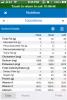
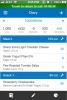
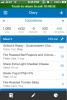
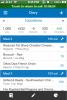
  • Here is a sample of how I get my Protein in without a shake. This day is a little light on the calories (I normally try to get 800-1000). Each meal is about 5 oz in volume ( 6 months out). I apolog

  • LivingFree!
    LivingFree!

    For someone who has just had surgery thru the time they are back to solid foods, I would say it is impossible. Once back on solid foods with few dietary restrictions, it's still a challenge to get an
Posted Images

Featured Replies

I can manage more like 5 meals a day ... assuming no nausea and no throwing up. I'd love some cheesecake. Some tail - I was looking forward to that at 6 months out.

:)

Looks like you've got something good going there. My question is: does your docs' office help you with this or do you do it yourself?

Join the conversation

You can post now and register later. If you have an account, sign in now to post with your account.

Guest
Reply to this topic...

Account

Navigation

Search

Search

Configure browser push notifications

Chrome (Android)
  1. Tap the lock icon next to the address bar.
  2. Tap Permissions → Notifications.
  3. Adjust your preference.
Chrome (Desktop)
  1. Click the padlock icon in the address bar.
  2. Select Site settings.
  3. Find Notifications and adjust your preference.