Skip to content
View in the app

A better way to browse. Learn more.

BariatricPal

A full-screen app on your home screen with push notifications, badges and more.

To install this app on iOS and iPadOS
  1. Tap the Share icon in Safari
  2. Scroll the menu and tap Add to Home Screen.
  3. Tap Add in the top-right corner.
To install this app on Android
  1. Tap the 3-dot menu (⋮) in the top-right corner of the browser.
  2. Tap Add to Home screen or Install app.
  3. Confirm by tapping Install.

110 lbs gone w/ pics

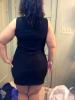
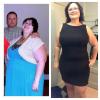
Hi everyone. My surgery was 2/25/13. HW 340, DOS 301, CW 230. I'm 5 months out and 110 lbs down. From 26/28 to 14/16. Most people don't recognize me. My own father walked past me and didn't know who I was. I'm doing things I could never do before. I love my sleeve.

post-47645-13813668403223_thumb.jpg

post-47645-13813668404236_thumb.jpg

post-47645-13813668405102_thumb.jpg

  • Replies 32
  • Views 3.5k
  • Created
  • Last Reply

Featured Replies

Very nice!

Looking great! You look so much younger too! Keep up the great job
You look amazing & you definitely look sooo much younger!!!! You have done an awesome job!!!! Wishing you the best on your continued journey!!!! You are an inspiration to me!!!!

Wow, you look amazing!!!! I can not wait till I can buy smaller clothes :)

Absolutely terrific!! You have worked hard at this and it is showing!! :)

Look at that hourglass shape!! Way to go, you are doing great.

Shut........up! NO WAY are all three of those pictures you. Looks like a family collage with you and your two grandmothers. Same beautiful skin, same sparkle in the eyes, different generations. I think it's time to change your profile pic, my dear (might I suggest the one of you in the pink shirt?).

Looking gorgeous. Thank you so much for sharing!

Your look awesome congrats you look so much younger

wow you look beautiful!

ABSOLUTELY STUNNING!!!!

I would never think those pics are the same person! Congratulations on your success!

Congratulations on your success! You look beautiful.

Archived

This topic is now archived and is closed to further replies.

Account

Navigation

Search

Search

Configure browser push notifications

Chrome (Android)
  1. Tap the lock icon next to the address bar.
  2. Tap Permissions → Notifications.
  3. Adjust your preference.
Chrome (Desktop)
  1. Click the padlock icon in the address bar.
  2. Select Site settings.
  3. Find Notifications and adjust your preference.