Skip to content
View in the app

A better way to browse. Learn more.

BariatricPal

A full-screen app on your home screen with push notifications, badges and more.

To install this app on iOS and iPadOS
  1. Tap the Share icon in Safari
  2. Scroll the menu and tap Add to Home Screen.
  3. Tap Add in the top-right corner.
To install this app on Android
  1. Tap the 3-dot menu (⋮) in the top-right corner of the browser.
  2. Tap Add to Home screen or Install app.
  3. Confirm by tapping Install.
  • Appearance

Join BariatricPal free

  • Ask your own questions
  • Reply and follow topics
  • Message other members
  • No cost, no spam

Apps After Weight Loss Surgery

After your surgery and on your way to a thinner and healthier life, did any of you use an app to help you keep on track to reach your goals? Which apps did you use? There are a lot of choices and many of them seem similar.

  • Replies 9
  • Views 1.4k
  • Created
  • Last Reply

Top Posters In This Topic

Most Popular Posts

  • lizonaplane
    lizonaplane

    Two popular choices are MyFitnessPal and Baritastic. I just started a thread on this this morning.

  • Baritastic. Still using it every day to track calorie, water and vitamins intake. Love it.

Posted Images
Featured Replies

Two popular choices are MyFitnessPal and Baritastic. I just started a thread on this this morning.

Baritastic. Still using it every day to track calorie, water and vitamins intake. Love it.

13 minutes ago, dms75 said:

Baritastic. Still using it every day to track calorie, Water and Vitamins intake. Love it.

Just curious, why did you choose Baritastic rather than MyFitnessPal? I've been using MFP since 2012 and I don't want to start all over with something else, but some people really like Baritastic and I'm wondering why. I don't think you can track vitamins on MFP, but you can track calories, macros, and water. I am not interested in tracking vitamins because I already remember to take all my medications with no issues.

  • Author
On 5/11/2021 at 4:51 AM, lizonaplane said:

Two popular choices are MyFitnessPal and Baritastic. I just started a thread on this this morning.

what's your choice between the two?

Just now, Numbheart said:

what's your choice between the two?

I have never tried Baritastic; I'm very happy with MFP. I've used it since 2012. Yes, it has lots of ads, but you can enter in recipes easily and it has a huge database of foods, both of which are important to me. For me, the main reason to stick with it is that it has such a long history for me. If I didn't have a history with either, I'd try both and then decide. I think a lot of people like the "goal circle" on Baritastic and like that the feed isn't filled with ads, but I never really look at the feed, so I don't really care about that. I like that I can use MFP on the computer or the phone and it works well on both. Some people have said Baritastic is nicer visually, but I'm not that focused on design.

I have only tried Baritastic but it suits my needs.

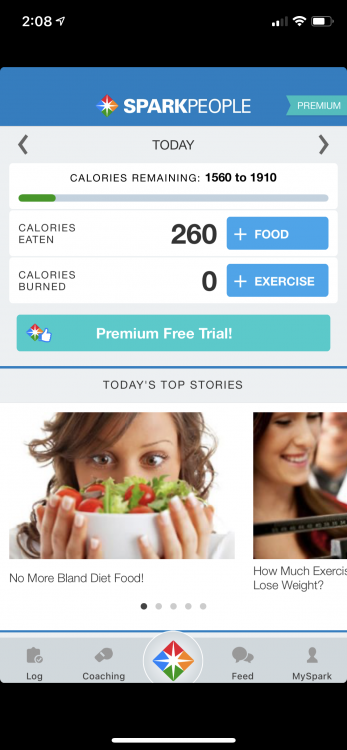
I’ve used SparkPeople for years (even before WLS) and I still use it now post op in maintenance. I tried MyFitnessPal but didn’t like it.
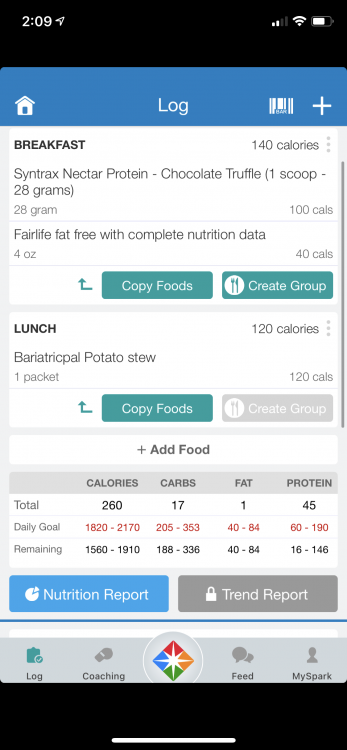
Im not sure how similar it is to other apps but it does also have a website version (same login info) that offers groups, personal mail, blog posts from members, along with tracking quality of life measures (sleep, stress, etc.), and inches as well as weight (can track in app).
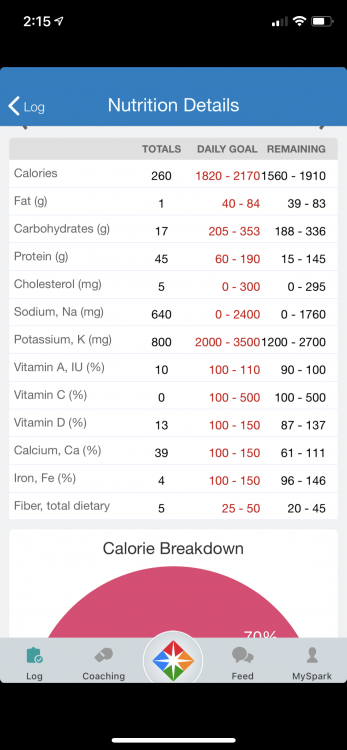
I can scan food barcodes, add items not listed, add meals from the SparkRescipes app, and add water intake and exercise as well as read articles, post updates and pictures of progress and adjust some settings. With the nutrition tab (to track food) I can even see a macro breakdown by meal if I click the 3 dots to the right side as well as at the bottom. The nutrition details for the day lets me see where I’m at with tracked vitamins and minerals as well as fiber and sodium. It’s a great way to see what I can do a little different to hit goals the next day.
It’s not perfect by any means but I love the community support and ease of use so I’ve stuck with it.

D61AE5EC-7BB8-4F79-BB0B-C17E4BFD02B4.png

BCD1AACA-19BD-4C2A-AECB-1168227DFB30.png

E0B88D91-0528-45BB-941C-C0D74C75BCDC.png

Join the conversation

You can post as a guest; create a free account to track replies, follow topics, and be part of the largest weight loss surgery community.

Join the conversation

You can post now and register later. If you have an account, sign in now to post with your account.

Guest
Reply to this topic...

Account

Navigation

Search

Search

Configure browser push notifications

Chrome (Android)
  1. Tap the lock icon next to the address bar.
  2. Tap Permissions → Notifications.
  3. Adjust your preference.
Chrome (Desktop)
  1. Click the padlock icon in the address bar.
  2. Select Site settings.
  3. Find Notifications and adjust your preference.