Skip to content
View in the app

A better way to browse. Learn more.

BariatricPal

A full-screen app on your home screen with push notifications, badges and more.

To install this app on iOS and iPadOS
  1. Tap the Share icon in Safari
  2. Scroll the menu and tap Add to Home Screen.
  3. Tap Add in the top-right corner.
To install this app on Android
  1. Tap the 3-dot menu (⋮) in the top-right corner of the browser.
  2. Tap Add to Home screen or Install app.
  3. Confirm by tapping Install.

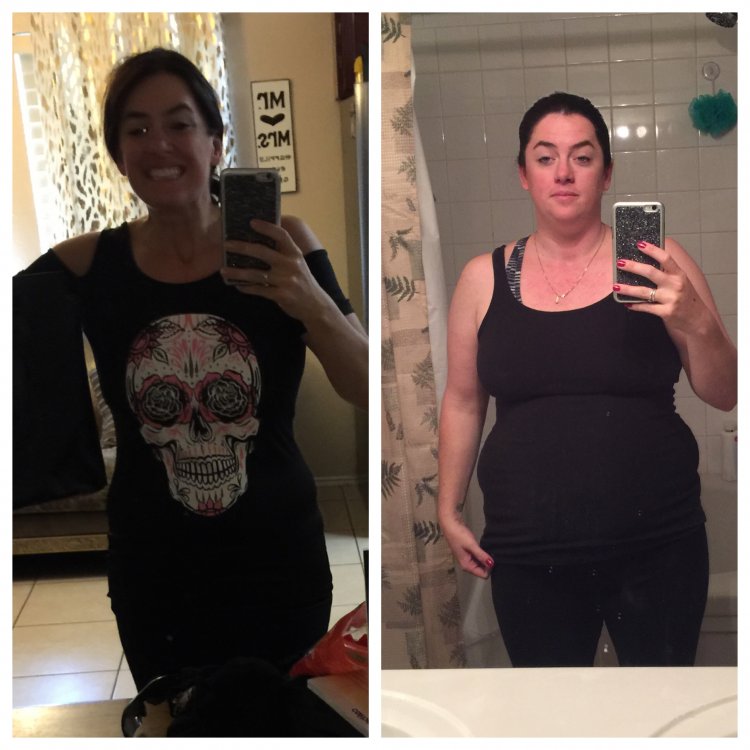
I am so happy!!!!

  • Replies 31
  • Views 3.1k
  • Created
  • Last Reply

Featured Replies

Your smile says it all!!! WOW! two months? That's great! :)

  • Author

❤️❤️ Thank you so much! I was so scared in the beginning and the thoughts after surgery that this wouldn't work for me. I'm glad I kept my head up and worked hard! It's an amazing journey!

You're doing great! Congratulations!

Isn't it great when positive choices yields positive changes which reinforces those positive choices? Congrats on the new you!!

Great job you look awesome[emoji1491]


Hooray! It's an amazing feeling.


Wow, you look great and happy. Thank you for sharing.

Sent from my SM-G935P using BariatricPal mobile app

  • Author

I had the gastric sleeve on May 2, 2017. My starting weight was 214, current weight 158! I'm running 5 days a week and eating protein protein protein! Thanks everyone ❤️❤️

  • Author
33 minutes ago, dcbella6 said:

And i am new to the group :)

<img src="https://s.bariatricpal.com/uploads/emoticons/default_smile.png" alt=":)" srcset="https://s.bariatricpal.com/uploads/emoticons/smile@2x.png 2x" width="20" height="20"> lol

Sent from my SM-S120VL using BariatricPal mobile app

You are going to do awesome!

Archived

This topic is now archived and is closed to further replies.

Trending Products

PatchAid Vitamin Patches

Account

Navigation

Search

Search

Configure browser push notifications

Chrome (Android)
  1. Tap the lock icon next to the address bar.
  2. Tap Permissions → Notifications.
  3. Adjust your preference.
Chrome (Desktop)
  1. Click the padlock icon in the address bar.
  2. Select Site settings.
  3. Find Notifications and adjust your preference.