Skip to content
View in the app

A better way to browse. Learn more.

BariatricPal

A full-screen app on your home screen with push notifications, badges and more.

To install this app on iOS and iPadOS
  1. Tap the Share icon in Safari
  2. Scroll the menu and tap Add to Home Screen.
  3. Tap Add in the top-right corner.
To install this app on Android
  1. Tap the 3-dot menu (⋮) in the top-right corner of the browser.
  2. Tap Add to Home screen or Install app.
  3. Confirm by tapping Install.
  • Appearance

Join BariatricPal free

  • Ask your own questions
  • Reply and follow topics
  • Message other members
  • No cost, no spam

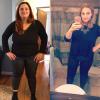
6 month Surgiversary!

Well it's been a hectic 6 months! A lot of ups and downs for me, but I'm so happy so far.

Down 75lbs!

SW 256lbs

CW 181

post-257611-14743816090159_thumb.jpgpost-257611-14743816370571_thumb.jpg

  • Replies 24
  • Views 3.5k
  • Created
  • Last Reply

Top Posters In This Topic

Most Popular Posts

Posted Images

Featured Replies

Surgiversery, I like the word

Sent from me to you!

Wow! You look amazing! How tall are you? I'm 5'5 and have a very similar start weight.

Sent from my iPhone using the BariatricPal App

I am 5'4ish? Lol

Current weight 176

I'm excited because my Birthday is coming up I will be 33, and it's going to be the first time in a long time I will have more than 1 or 2 photos without me cringing at the thought of being photographed!

Same here my bday is coming up in January... the big 4-0 and I would love to be well on my way!

Sent from my iPhone using the BariatricPal App

  • Author

I am married with 3 kids. [emoji4]

  • 5 weeks later...

Join the conversation

You can post as a guest; create a free account to track replies, follow topics, and be part of the largest weight loss surgery community.

Join the conversation

You can post now and register later. If you have an account, sign in now to post with your account.

Guest
Reply to this topic...

Account

Navigation

Search

Search

Configure browser push notifications

Chrome (Android)
  1. Tap the lock icon next to the address bar.
  2. Tap Permissions → Notifications.
  3. Adjust your preference.
Chrome (Desktop)
  1. Click the padlock icon in the address bar.
  2. Select Site settings.
  3. Find Notifications and adjust your preference.