Skip to content
View in the app

A better way to browse. Learn more.

BariatricPal

A full-screen app on your home screen with push notifications, badges and more.

To install this app on iOS and iPadOS
  1. Tap the Share icon in Safari
  2. Scroll the menu and tap Add to Home Screen.
  3. Tap Add in the top-right corner.
To install this app on Android
  1. Tap the 3-dot menu (⋮) in the top-right corner of the browser.
  2. Tap Add to Home screen or Install app.
  3. Confirm by tapping Install.

Halo Top ice cream

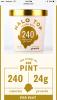
WholeFoods is carrying this. High Protein excellent consistency and taste. Whole pint is only 240-280 calories!

6 flavors i think.

post-284996-14662771549298_thumb.jpgpost-284996-14662771762462_thumb.jpg

Edited by LisaMergs

  • Replies 4
  • Views 3.5k
  • Created
  • Last Reply

Featured Replies

I love this ice cream! It's a great treat that has a decent amount of protein, low sugar, and low cal. I would caution people who have an issue with sugar alcohols to be careful, though. If you're able to enjoy a few bites and put it away, it's a great treat. The lemon cake is my favorite flavor. :)

  • Author

The great thing about erythritol as a sugar alcohol is that for MOST people, it doesn't cause the GI disturbances that malitol, xylitol and sorbitol do.

The molecule that makes up erythritol is so much smaller, and very little of it can reach the colon to feed the bacteria that would cause the upset. And for the percentage that does make it- well the intestinal bacteria can't digest it. Erythritol enters the blood stream and 90% is actually excreted in the urine untouched.

It has a zero glycemic index too!

The warning for it is that should you consume over 50g at once you may have stomach upset/grumbling.

I've always been an ice cream fan, and this totally does the trick for me. I usually have about half the standard serving--so only about 35 calories and I feel like it's a real treat. chocolate Mocha rocks!

Sent from my iPhone using the BariatricPal App

Archived

This topic is now archived and is closed to further replies.

Account

Navigation

Search

Search

Configure browser push notifications

Chrome (Android)
  1. Tap the lock icon next to the address bar.
  2. Tap Permissions → Notifications.
  3. Adjust your preference.
Chrome (Desktop)
  1. Click the padlock icon in the address bar.
  2. Select Site settings.
  3. Find Notifications and adjust your preference.