Skip to content
View in the app

A better way to browse. Learn more.

BariatricPal

A full-screen app on your home screen with push notifications, badges and more.

To install this app on iOS and iPadOS
  1. Tap the Share icon in Safari
  2. Scroll the menu and tap Add to Home Screen.
  3. Tap Add in the top-right corner.
To install this app on Android
  1. Tap the 3-dot menu (⋮) in the top-right corner of the browser.
  2. Tap Add to Home screen or Install app.
  3. Confirm by tapping Install.

Surgery today!

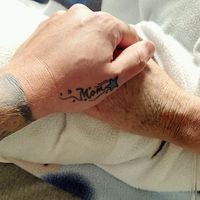
Im laying here in pre op waiting on the dr to get here of course. Surgery was suppose to start at 9am! Wish me luck!!!

Sent from my iPhone using VST

  • Replies 14
  • Views 1k
  • Created
  • Last Reply

Featured Replies

  • Author

Thanks!!

Sent from my iPhone using VST

Im laying here in pre op waiting on the dr to get here of course. Surgery was suppose to start at 9am! Wish me luck!!!

Sent from my iPhone using VST

Good luck

where ru having it done? Good Luck!

OMG! You are on your way to a healthier life with the horrible side effects of being HOT and SEXY! Keep it up.... :) I know that you are going to do fine...... :)

Hope all goes well & that you have a speedy recovery!

Im laying here in pre op waiting on the dr to get here of course. Surgery was suppose to start at 9am! Wish me luck!!!

Sent from my iPhone using VST

Good Luck!!

Good luck!

Good Luck!

Was sleeved on 4/8. You will be fine. The worst thing is the gas. Trying to walk. Hard to eat walk with air.No regrets though.

  • Author

Surgery over and only complaint i have is burning in stomach!

Sent from my iPhone using VST

  • Author
where ru having it done? Good Luck!

Southern Surgical in Slidell

Sent from my iPhone using VST

Archived

This topic is now archived and is closed to further replies.

Trending Products

PatchAid Vitamin Patches

Account

Navigation

Search

Search

Configure browser push notifications

Chrome (Android)
  1. Tap the lock icon next to the address bar.
  2. Tap Permissions → Notifications.
  3. Adjust your preference.
Chrome (Desktop)
  1. Click the padlock icon in the address bar.
  2. Select Site settings.
  3. Find Notifications and adjust your preference.