
Skip to content
View in the app

A better way to browse. Learn more.

BariatricPal

A full-screen app on your home screen with push notifications, badges and more.

To install this app on iOS and iPadOS
  1. Tap the Share icon in Safari
  2. Scroll the menu and tap Add to Home Screen.
  3. Tap Add in the top-right corner.
To install this app on Android
  1. Tap the 3-dot menu (⋮) in the top-right corner of the browser.
  2. Tap Add to Home screen or Install app.
  3. Confirm by tapping Install.

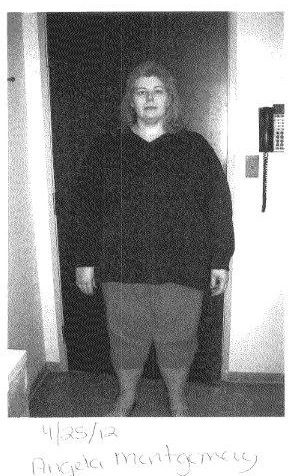
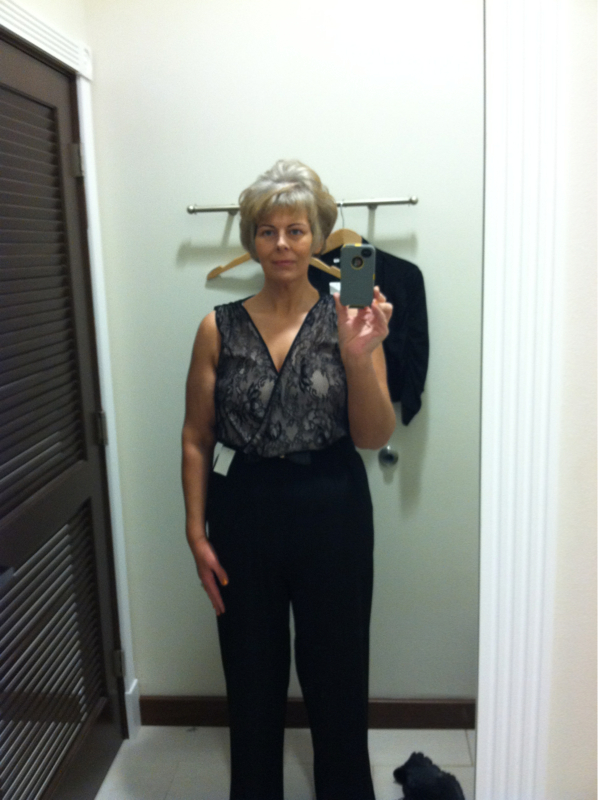
Minus 140 lbs - makeover

  • Replies 19
  • Views 1.7k
  • Created
  • Last Reply

Featured Replies

You look amazing!!!! Your hard work has truly paid off :)

Great work!!! You look fabulous!

You look fantastic! Congratulations to you.

Minus 140 lbs

Looking Ahead

oh no!!!! :o

here we go again!!!!

so, you lost 140 lbs????

big deal!!!!!

ya da ya da ya da

you think you are something special? :o

everyone says, "oh you look great, amazing, beautiful et al"

aren't you sick of hearing such nonsense!!!!

wellllll, you better get used to it, cuz i'm a big fan lady :)

what an accomplishment

terrific job

keep up the great work today, tomorrow and always for the rest of your healthier, happier and longer life :)

congrats :)

  • Author

Thank you so much everyone..I could NOT have done this without the encouragement of this website and friends I've met on here. I bow to you and say Thank you. :)

You look just lovely. Congratulations to you!
You look amazing congrats on all the work you did to get here!

Damn!!! Rock that sleeve!!!! Just beautiful!

Congrats. You look wonderful.

You're absolutely gorgeous!!

You are such an inspiration to us newbies. Awesome!

Archived

This topic is now archived and is closed to further replies.

Trending Products

PatchAid Vitamin Patches

Account

Navigation

Search

Search

Configure browser push notifications

Chrome (Android)
  1. Tap the lock icon next to the address bar.
  2. Tap Permissions → Notifications.
  3. Adjust your preference.
Chrome (Desktop)
  1. Click the padlock icon in the address bar.
  2. Select Site settings.
  3. Find Notifications and adjust your preference.