Skip to content
View in the app

A better way to browse. Learn more.

BariatricPal

A full-screen app on your home screen with push notifications, badges and more.

To install this app on iOS and iPadOS
  1. Tap the Share icon in Safari
  2. Scroll the menu and tap Add to Home Screen.
  3. Tap Add in the top-right corner.
To install this app on Android
  1. Tap the 3-dot menu (⋮) in the top-right corner of the browser.
  2. Tap Add to Home screen or Install app.
  3. Confirm by tapping Install.

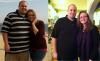
Progress pic.

  • Popular Post

I still don't see a difference in a mirror but I can see them in pictures and the way clothes fit.

I was sleeved on 12/20 and was 385 and am 309 today. 76lbs and counting! Hoping to lose around another 90-100 lbs, but ill take 76 in a little more then 2 months. Love my sleeve!

post-45615-13813663604832_thumb.jpg

  • Replies 13
  • Views 1.4k
  • Created
  • Last Reply

Featured Replies

Woohoo looking great!!

You look amazing!!! And YEAH!! There is a big difference!!

Rock that sleeve!!

What a difference! Glad you are doing so well and what an inspiration! I'm one month post op and have lost 21 lbs - I still can't see it but my clothes fit different too - love my sleeve! Good luck with the rest of your journey and congrats!

Awesome, you look great. Keep up the good work

Thanks for the dude pic. I'm getting my sleeve on 3/11 and its nice to see how it's going for the guys out there. It looks like we have similar body type and starting stats, so I'll be keeping an eye on you to see what I have to look forward to a couple months down the road. Keep it up!

  • Author

Thanks for all the encouragement and kind words! It really helps drive me and hopefully i helped someone bc I know I love looking at others pictures for inspiration.

Yes, big difference! You look great. Congrats.

  • Author

Thank you!

You look great, so handsome and happy. You must be so proud. Beautiful couple, too! Thanks for sharing your progress.

Congrats on the loss, great work!!

Archived

This topic is now archived and is closed to further replies.

Trending Products

PatchAid Vitamin Patches

Account

Navigation

Search

Search

Configure browser push notifications

Chrome (Android)
  1. Tap the lock icon next to the address bar.
  2. Tap Permissions → Notifications.
  3. Adjust your preference.
Chrome (Desktop)
  1. Click the padlock icon in the address bar.
  2. Select Site settings.
  3. Find Notifications and adjust your preference.