Skip to content
View in the app

A better way to browse. Learn more.

BariatricPal

A full-screen app on your home screen with push notifications, badges and more.

To install this app on iOS and iPadOS
  1. Tap the Share icon in Safari
  2. Scroll the menu and tap Add to Home Screen.
  3. Tap Add in the top-right corner.
To install this app on Android
  1. Tap the 3-dot menu (⋮) in the top-right corner of the browser.
  2. Tap Add to Home screen or Install app.
  3. Confirm by tapping Install.

I'm Making Progress Pics

  • Popular Post

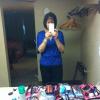
I'm 2 months out and I'm not quite where I want to be but thank God I'm not where I used to be. I'm making progress and wanted to share a couple of pics below. The night before surgery and last night.

post-18793-13813658132775_thumb.jpg

post-18793-13813658133007_thumb.jpg

  • Replies 36
  • Views 2.8k
  • Created
  • Last Reply

Top Posters In This Topic

Most Popular Posts

Posted Images

Featured Replies

  • Author

Congrats! You look amazing and beautiful How do you feel? Here's to every lb lost. :-) Your pictures are inspiring.

Thank you Mom of 2. I feel GREAT. I've actually started to jog a little bit while walking. It feels great.

Thanks for the inspiring pics! Congrats, you look great!

You are looking awesome! :biggrin2:

Lady,

You are doing fabulous!!!! You really can tell a difference.

Great work, can't wait to see how you look in just a few more months! You're definitely making progress.

~Cheri

U look absolutely beautiful! Keep up the hard work and keep ROCKIN that SLEEVE! ;)

Awesome! Keep rocking that sleeve!! :)

You look very nice. Congrats :0)

  • Author

Thanks to each and everyone of you for the kind words of encouragement. This site has given me the confidence to post full body pics. I would have never done something like this in the past because I have always been ashamed of my weight. Thanks again and I wish all of you much success.

  • Author

Looking good! Way to work it.

Thank You

Join the conversation

You can post now and register later. If you have an account, sign in now to post with your account.

Guest
Reply to this topic...

Trending Products

PatchAid Vitamin Patches

Account

Navigation

Search

Search

Configure browser push notifications

Chrome (Android)
  1. Tap the lock icon next to the address bar.
  2. Tap Permissions → Notifications.
  3. Adjust your preference.
Chrome (Desktop)
  1. Click the padlock icon in the address bar.
  2. Select Site settings.
  3. Find Notifications and adjust your preference.