Skip to content
View in the app

A better way to browse. Learn more.

BariatricPal

A full-screen app on your home screen with push notifications, badges and more.

To install this app on iOS and iPadOS
  1. Tap the Share icon in Safari
  2. Scroll the menu and tap Add to Home Screen.
  3. Tap Add in the top-right corner.
To install this app on Android
  1. Tap the 3-dot menu (⋮) in the top-right corner of the browser.
  2. Tap Add to Home screen or Install app.
  3. Confirm by tapping Install.

Tracking apps

Hey y'all I start my preop diet tomorrow and I am looking for a good way to start tracking inches lost. Anyone have any apps or tips/tricks they can share besides using like Excel or something?

I appreciate it, so ready for the loser's bench!

Sent from my SM-N986U using BariatricPal mobile app

  • Replies 9
  • Views 2.2k
  • Created
  • Last Reply

Top Posters In This Topic

Most Popular Posts

  • GivinItMyALL
    GivinItMyALL

    I've been using the Baritastic app, and really enjoy it. It does have measurements as one of its features (though admittedly, I haven't used it), but I mostly use it for logging my meals, water, etc.

  • Changingmylife2020
    Changingmylife2020

    My fitness tracks your calories weight and inches. ?

  • Mr Alley Gator
    Mr Alley Gator

    My fitness is the one i used also however I did not measure ............ heck i was getting a size smaller pair of shorts ever other week - As for inches Stand in front of a mirror in the exact

Posted Images
Featured Replies

I've been using the Baritastic app, and really enjoy it. It does have measurements as one of its features (though admittedly, I haven't used it), but I mostly use it for logging my meals, water, etc...

  • Author

Thank you guys so much! I have both those apps but didn't realize they tracked inches lose! [emoji4]

Sent from my SM-N986U using BariatricPal mobile app

My fitness is the one i used also however I did not measure ............ heck i was getting a size smaller pair of shorts ever other week -

As for inches Stand in front of a mirror in the exact place every month. Take a picture you will be amazed after the months roll by how the pictures change! Kinda your hidden picture log.

I use MyFitnessPal. It's free and it measures a daily food diary, weight, and measurements.

Both these apps are really good. I used My Fitness Pal before the surgery but found that I wanted a bit more bariatric support post-op; especially with my lowered calories. You can easily just not end the day to get the last message of being too low in calories but it helped me more to be with full bariatric support so I am currently on baritastic and I do enjoy it. Only thing I had to get used to was it being only on my phone. Well, had to face tiny phone screen apps eventually lol.

One third option I really liked was Carb Manager. It was pretty simple; less support and less active for that then the other two apps but if you just want something that simply tracks everything and is very user friendly, that one is good too. All are free-you can pay for premium on my fitness pal but I wouldn't pay for what they give you extra.

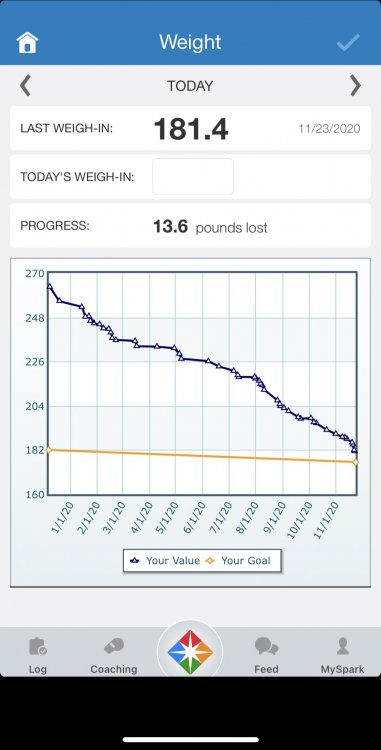
I use SparkPeople (the website and app). The website lets you track inches, mood, stress, sleep, etc. along with groups you can join with fun challenges like staying up on water intake and exercise. The tracking for inches and weight also shows in a line graph over time so you can see trending. The app I use mostly for tracking food and status updates along with weight logging (even though I could use the website). I don’t much use the exercise tracker although it has loads of options for it.

Here’s what the weight tracker part of the app looks like. The inches tracker looks the same on the website.

D1A2A225-1600-4B0F-BB2C-C8158B92DA86.jpeg

Maybe I'm old-fashioned, but I love paper journals! It may require a little more work for calculations, but I found a cool journal called Commit30, that is set up especially for tracking meals, exercise, and whatever other stats and goals you want.

I use Cronometer and absolutely love it. You can track your foods, make custom foods, track biometrics, vitamins, exercise etc. I also like all of the charts that you can download and print for your doctor.

Join the conversation

You can post now and register later. If you have an account, sign in now to post with your account.

Guest
Reply to this topic...

Trending Products

PatchAid Vitamin Patches

Account

Navigation

Search

Search

Configure browser push notifications

Chrome (Android)
  1. Tap the lock icon next to the address bar.
  2. Tap Permissions → Notifications.
  3. Adjust your preference.
Chrome (Desktop)
  1. Click the padlock icon in the address bar.
  2. Select Site settings.
  3. Find Notifications and adjust your preference.