Skip to content
View in the app

A better way to browse. Learn more.

BariatricPal

A full-screen app on your home screen with push notifications, badges and more.

To install this app on iOS and iPadOS
  1. Tap the Share icon in Safari
  2. Scroll the menu and tap Add to Home Screen.
  3. Tap Add in the top-right corner.
To install this app on Android
  1. Tap the 3-dot menu (⋮) in the top-right corner of the browser.
  2. Tap Add to Home screen or Install app.
  3. Confirm by tapping Install.

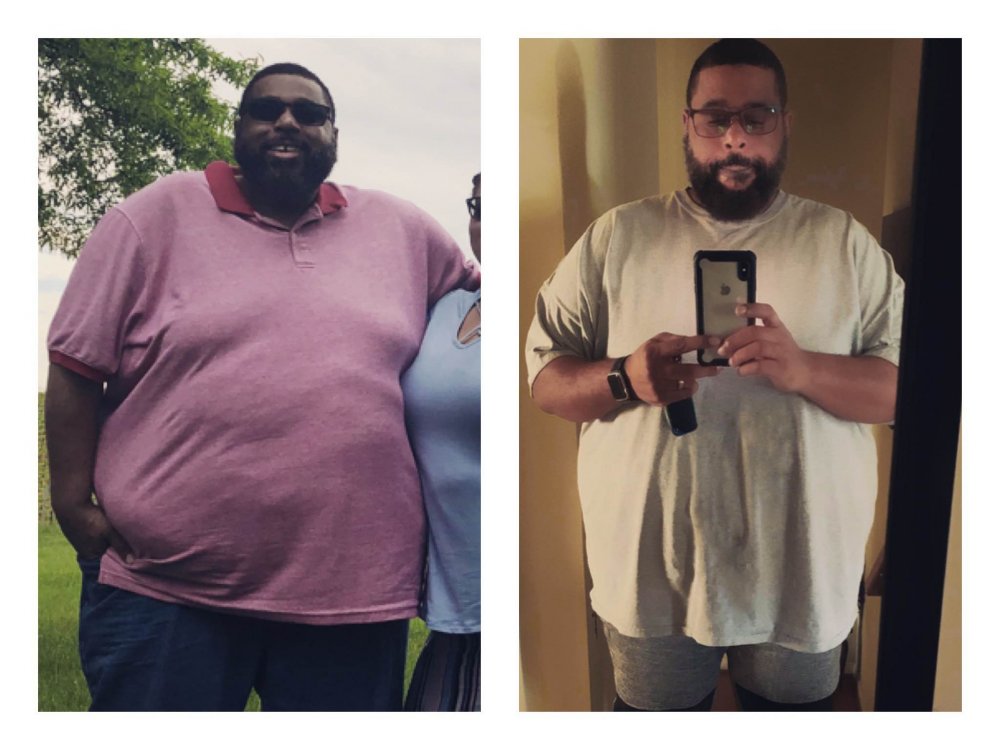
Happy with my decision!!!

  • Popular Post
82lbs down in all, 38lbs down since sleeve. 12-10-18

Started at 457 now 375. A good ways to go, but I can see and feel the difference!! Good luck to you all!!

Clasik

image-0.00107288360595703.jpg

  • Replies 16
  • Views 1.6k
  • Created
  • Last Reply

Top Posters In This Topic

Most Popular Posts

Posted Images

Featured Replies

37 minutes ago, MrClasik said:

82lbs down in all, 38lbs down since sleeve. 12-10-18

Started at 457 now 375. A good ways to go, but I can see and feel the difference!! Good luck to you all!!

Clasik

image-0.00107288360595703.jpg

KEEP UP THE GOOD WORK LOOKING GREAT KEEP GOING !!!!!

Fantastic progress, congrats! Keep up the great work!

  • Author
On 01/02/2019 at 19:49, Swanton_Bomb said:


Looking good, man! You must be proud of your hard work!


Extremely. Gettin it done.

How inspiring! You look great!

Congratulations, MrClasik! Keep killin it!

Congratulations!! That's wonderful!! My drs office told me to take a picture of myself every month because you can really see the difference when you can't see it on the scale. Keep up the good work!!!!

WooHoo. You are looking great. I bet you feel better
Good start, hoping to hear more from you as the Weight goes down. Congratulations.
  • 4 weeks later...
  • Author
Down to 355!! 102lbs down. Getting there.

Join the conversation

You can post now and register later. If you have an account, sign in now to post with your account.

Guest
Reply to this topic...

Trending Products

PatchAid Vitamin Patches

Account

Navigation

Search

Search

Configure browser push notifications

Chrome (Android)
  1. Tap the lock icon next to the address bar.
  2. Tap Permissions → Notifications.
  3. Adjust your preference.
Chrome (Desktop)
  1. Click the padlock icon in the address bar.
  2. Select Site settings.
  3. Find Notifications and adjust your preference.