Skip to content
View in the app

A better way to browse. Learn more.

BariatricPal

A full-screen app on your home screen with push notifications, badges and more.

To install this app on iOS and iPadOS
  1. Tap the Share icon in Safari
  2. Scroll the menu and tap Add to Home Screen.
  3. Tap Add in the top-right corner.
To install this app on Android
  1. Tap the 3-dot menu (⋮) in the top-right corner of the browser.
  2. Tap Add to Home screen or Install app.
  3. Confirm by tapping Install.

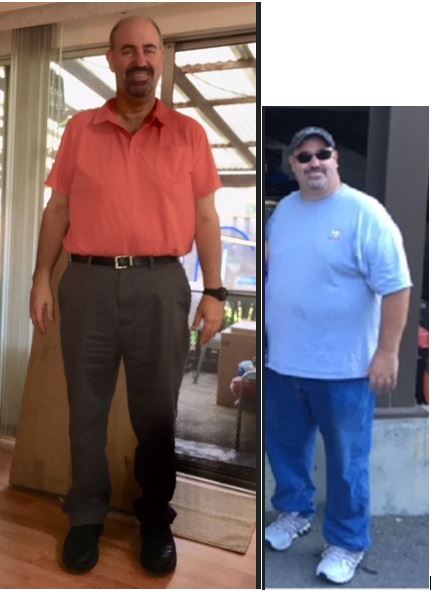
8 Months out.....

SidebySide.JPG.6b84e1d84006b3a7eafb5a95580397b8.JPG

Inching closer towards 200lbs. Been hitting stalls, but see my next goal insight! Currently at 207! Fitting into XL shirts is awesome! Not being out of breath after walking up a flight of stairs, having the energy to walk down 4 flights of stairs instead of taking the elevator. Doing my first 5k next weekend, and not worried about it!

  • Replies 8
  • Views 946
  • Created
  • Last Reply

Featured Replies

Lookin' great! Congrats on your success thus far!

Great job! Looking good!

Totally different! Great job! And you look younger too!

U look great, amazing job!

Very impressive!

Wow! Terrific work, man!!! Congrats!

Archived

This topic is now archived and is closed to further replies.

Trending Products

PatchAid Vitamin Patches

Account

Navigation

Search

Search

Configure browser push notifications

Chrome (Android)
  1. Tap the lock icon next to the address bar.
  2. Tap Permissions → Notifications.
  3. Adjust your preference.
Chrome (Desktop)
  1. Click the padlock icon in the address bar.
  2. Select Site settings.
  3. Find Notifications and adjust your preference.