Skip to content
View in the app

A better way to browse. Learn more.

BariatricPal

A full-screen app on your home screen with push notifications, badges and more.

To install this app on iOS and iPadOS
  1. Tap the Share icon in Safari
  2. Scroll the menu and tap Add to Home Screen.
  3. Tap Add in the top-right corner.
To install this app on Android
  1. Tap the 3-dot menu (⋮) in the top-right corner of the browser.
  2. Tap Add to Home screen or Install app.
  3. Confirm by tapping Install.
  • Appearance

Join BariatricPal free

  • Ask your own questions
  • Reply and follow topics
  • Message other members
  • No cost, no spam

Lost 100lbs 10 months after surgery

  • Replies 19
  • Views 1.7k
  • Created
  • Last Reply

Top Posters In This Topic

Most Popular Posts

Posted Images

Featured Replies

@@Gianacruz

Outstanding! how do you feel at ten months out?

I had my surgery on July 29, I am also 100 pounds down

Wow congrats ladies!!!!...I had surgery December 2014 and i've lost over 55lbs!!!

No words

A PICTURE SAYS 1,000 WORDS

keep up the good job :)

i know you will

kathy

congrats

post-221590-14329006531844_thumb.jpg
post-221590-14329007192998_thumb.jpg

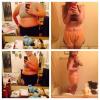
The top foto was when I was weighing 286 pounds, my before foto. And the bottom foto is now and I weight as of yesterday 183

Congratulations!

Congratulations. You look awesome

wow amazing ladies!! u guys are an inspirations for us beginners!!! :)

Amazing inspiration... I am 3 month through sleeve and I have lost 30 pounds!!!

Hope to achieve the 100 pounds result, just like you girls.

What did you eat and how much did you exercise?!?!? Please share with us.

Congrats! You look great! I was sleeves on 8/12/14 and am down 153 lbs

Kealot wonderful progress for you also! You all are great inspirations

Join the conversation

You can post as a guest; create a free account to track replies, follow topics, and be part of the largest weight loss surgery community.

Join the conversation

You can post now and register later. If you have an account, sign in now to post with your account.

Guest
Reply to this topic...

Account

Navigation

Search

Search

Configure browser push notifications

Chrome (Android)
  1. Tap the lock icon next to the address bar.
  2. Tap Permissions → Notifications.
  3. Adjust your preference.
Chrome (Desktop)
  1. Click the padlock icon in the address bar.
  2. Select Site settings.
  3. Find Notifications and adjust your preference.