Skip to content
View in the app

A better way to browse. Learn more.

BariatricPal

A full-screen app on your home screen with push notifications, badges and more.

To install this app on iOS and iPadOS
  1. Tap the Share icon in Safari
  2. Scroll the menu and tap Add to Home Screen.
  3. Tap Add in the top-right corner.
To install this app on Android
  1. Tap the 3-dot menu (⋮) in the top-right corner of the browser.
  2. Tap Add to Home screen or Install app.
  3. Confirm by tapping Install.

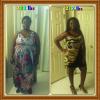
Before and after

Well everyone I know keeps saying how much my face has changed and saying to post pics so here it is

surgery: April 28th~~~current weight loss 20 pounds

post-34745-13813812105764_thumb.jpg

  • Replies 21
  • Views 2k
  • Created
  • Last Reply

Featured Replies

I can see a huge difference, you're beautiful!

WOW ... big difference.... :)

You look great!!!!!

  • Author

Thank you everybody. I personally didn't notice a difference until I compares these photos, first from January 1st, second a few days ago. After realizing the difference I'm feeling so motivated to keep going thanks again. If anyone else had before and after I'm excited to see them!!

surgery: April 28th~~~current weight loss 20 pounds

How do you post pictures?

Using cell/itouch click the plus on the right side almost corner.

You look great & yes big difference. Are you like me love wearing a hat? We need to stop that lmbo

  • Author
You look great & yes big difference. Are you like me love wearing a hat? We need to stop that lmbo

Lol yes I am always wearing a hat or skully. I agree would be great to stop just a habit to grab when I'm out and about.

surgery: April 28th~~~current weight loss 20 pounds

Will be 6 months post op this Friday

Beautiful! Awesome job girl!

You look amazing!

Archived

This topic is now archived and is closed to further replies.

Trending Products

PatchAid Vitamin Patches

Account

Navigation

Search

Search

Configure browser push notifications

Chrome (Android)
  1. Tap the lock icon next to the address bar.
  2. Tap Permissions → Notifications.
  3. Adjust your preference.
Chrome (Desktop)
  1. Click the padlock icon in the address bar.
  2. Select Site settings.
  3. Find Notifications and adjust your preference.