Skip to content
View in the app

A better way to browse. Learn more.

BariatricPal

A full-screen app on your home screen with push notifications, badges and more.

To install this app on iOS and iPadOS
  1. Tap the Share icon in Safari
  2. Scroll the menu and tap Add to Home Screen.
  3. Tap Add in the top-right corner.
To install this app on Android
  1. Tap the 3-dot menu (⋮) in the top-right corner of the browser.
  2. Tap Add to Home screen or Install app.
  3. Confirm by tapping Install.

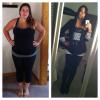
5 Month Post Op Before & After

  • Replies 31
  • Views 2.5k
  • Created
  • Last Reply

Featured Replies

wow! what was your starting weight?

You look stunning

This is the only time I see the difference. Down 81lbs! 15lbs away from my goal!!!!

You look amazing!!!!!

231 lbs!!!

Im now at 150-153

Wow! You look amazing. Even better, my starting weight is the same with my goal weight being 160. Nice to see what 150/160 could look like again. Surgery date is 11/29.

Sent from my iPhone using RNYTalk

This is the only time I see the difference. Down 81lbs! 15lbs away from my goal!!!!

Go girl, you look great!

Hot mama! You look great!

WOW.... beautiful !!!!

How stupid is this..I literally just teared up seeing your fantastic change. I am only 6 days out but have not been thin since high school, 18 years ago, so to think in a few months I will be posting pictures hopefully a beautiful as these...I cry. We are beautiful women dammit and soon enough we will be thin and beautiful!

  • Author

Wow! You look amazing. Even better' date=' my starting weight is the same with my goal weight being 160. Nice to see what 150/160 could look like again. Surgery date is 11/29.

Sent from my iPhone using RNYTalk[/quote']

That's awesome!!! Congratulation on ur surgery date!!! You'l hit 160 in no time and before you know ot you'll be t 130... And i dont exercise as much as i should. I am extra careful anout what i eat though! Are you excited?

Archived

This topic is now archived and is closed to further replies.

Trending Products

PatchAid Vitamin Patches

Account

Navigation

Search

Search

Configure browser push notifications

Chrome (Android)
  1. Tap the lock icon next to the address bar.
  2. Tap Permissions → Notifications.
  3. Adjust your preference.
Chrome (Desktop)
  1. Click the padlock icon in the address bar.
  2. Select Site settings.
  3. Find Notifications and adjust your preference.