Skip to content
View in the app

A better way to browse. Learn more.

BariatricPal

A full-screen app on your home screen with push notifications, badges and more.

To install this app on iOS and iPadOS
  1. Tap the Share icon in Safari
  2. Scroll the menu and tap Add to Home Screen.
  3. Tap Add in the top-right corner.
To install this app on Android
  1. Tap the 3-dot menu (⋮) in the top-right corner of the browser.
  2. Tap Add to Home screen or Install app.
  3. Confirm by tapping Install.

Join BariatricPal free

  • Ask your own questions
  • Reply and follow topics
  • Message other members
  • No cost, no spam

4 1/2 months post op...pics

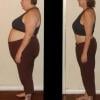
Today I am 4 1/2 month post op. The past month has been a struggle but I have finally reached two of my goals. I am at 75 lbs. lost and I broke the 200's and now I am in wonderland! I haven't been here since 10 th grade!

My stats:

Pre op : 270

Today: 195

Current pic was taken at 203 but I didn't want to get dressed today to take another! We are expecting 6+ inches of snow today...blah.

post-29297-13813664135593_thumb.jpg

  • Replies 6
  • Views 1.2k
  • Created
  • Last Reply

Featured Replies

Congrats

You look amazing! Keep it up. Cant wait to be where you at:)

Congrats! I have a question though were u constantly losing? I had surgery 2/23 and I was 253 and now I'm 235 It's been two weeks and I'm not losing anything I don't know what to do have u ever stalled or anything?!

  • Author

No I have not consistently lost it. I have stalled out so many times. The past month I was stuck at 208-203 and then finally I started working out more and eating better and I finally started dropping again. I had almost lost hope. I go weeks with only loosing a few lbs then I drop a few in a couple days. Don't loose hope at any point because it will eventually fall off. I had to make some changes though to jump start the weight loss again. Good luck to you.

Archived

This topic is now archived and is closed to further replies.

Account

Navigation

Search

Search

Configure browser push notifications

Chrome (Android)
  1. Tap the lock icon next to the address bar.
  2. Tap Permissions → Notifications.
  3. Adjust your preference.
Chrome (Desktop)
  1. Click the padlock icon in the address bar.
  2. Select Site settings.
  3. Find Notifications and adjust your preference.