Skip to content
View in the app

A better way to browse. Learn more.

BariatricPal

A full-screen app on your home screen with push notifications, badges and more.

To install this app on iOS and iPadOS
  1. Tap the Share icon in Safari
  2. Scroll the menu and tap Add to Home Screen.
  3. Tap Add in the top-right corner.
To install this app on Android
  1. Tap the 3-dot menu (⋮) in the top-right corner of the browser.
  2. Tap Add to Home screen or Install app.
  3. Confirm by tapping Install.

Weight loss progress!

  • Popular Post

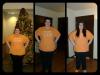
I started at 404.1 -06/01/2012

weight day of surgery 366.6- 12/17/2012

3 months post op 298.5 as of today!

best decision ive ever made!

post-54681-13813664064865_thumb.jpg

  • Replies 14
  • Views 1.1k
  • Created
  • Last Reply

Featured Replies

Wahoo!! That's awesome you look great

  • Author

Wahoo!! That's awesome you look great

thank you SO much!! :)

WOW girl! You are doing SO GREAT!

Very very inspiring!

...I'm dying to know the story behind the one orange sock . . . lol

Wow! Fantastic progress!

Congrats! You're looking great!

wow great loss... was that all post op? Any tips for us noobs.

  • Author

wow great loss... was that all post op? Any tips for us noobs.

ive lost 105.6 pounds in total, so including my preop diet and post op.

since 12/17/12 my surgery date ive lost 68.

tips: just stay determined and keep your eye on the prize!

i went through 2 hospital admissions in the last 3 months and a gallbladder removal, i was so unbelievably down about all this but i kept strong and am feeling better then ever!

  • Author

thanks everyone!! it means so much! i look forward to seeing everyone else's progress on their way to the new you :) :) :)

  • Author

WOW girl! You are doing SO GREAT!

Very very inspiring!

...I'm dying to know the story behind the one orange sock . . . lol

lol i didnt realize the socks were gonna be noticable in the picture. i just always wear mismatched socks everyday. shows my personality :)

congrats and well done you look fantastic :)

Looking good - congratulations on your loss!

AWESOME!!! You are an inspiration! Thanks for sharing your pictures

Archived

This topic is now archived and is closed to further replies.

Trending Products

PatchAid Vitamin Patches

Account

Navigation

Search

Search

Configure browser push notifications

Chrome (Android)
  1. Tap the lock icon next to the address bar.
  2. Tap Permissions → Notifications.
  3. Adjust your preference.
Chrome (Desktop)
  1. Click the padlock icon in the address bar.
  2. Select Site settings.
  3. Find Notifications and adjust your preference.