Skip to content
View in the app

A better way to browse. Learn more.

BariatricPal

A full-screen app on your home screen with push notifications, badges and more.

To install this app on iOS and iPadOS
  1. Tap the Share icon in Safari
  2. Scroll the menu and tap Add to Home Screen.
  3. Tap Add in the top-right corner.
To install this app on Android
  1. Tap the 3-dot menu (⋮) in the top-right corner of the browser.
  2. Tap Add to Home screen or Install app.
  3. Confirm by tapping Install.

2 Months Post-Op Before & After Pics

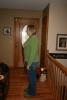
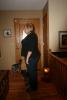
I know it is not drastic, but I am happy with my progress. :)

Before picture was on 11-8-12, the day before surgery...244 pounds.

After picture was 1-9-13, 2 month post-op....209 pounds.

post-44124-13813662204158_thumb.jpg

post-44124-13813662205261_thumb.jpg

  • Replies 14
  • Views 1.2k
  • Created
  • Last Reply

Featured Replies

  • Author

Pictures are switched. Hope everyone could figure that out. :)

It is significant! You can HELLA notice that you've lost weight. You look great!

Wow!! You look amazing! What an accomplishment in only 2 months. Congrats!

you do look great! what shoes are you wearing in the after shot? love them!

  • Author

you do look great! what shoes are you wearing in the after shot? love them!

Thanks!

Here are my shoes and where I ordered them from. You won't find a better price.

http://www.sierratradingpost.com/birkenstock-bern-clogs-suede-soft-footbed-for-women~p~4734h/?filterString=s~birkenstock%2F&colorFamily=04

It's a massive difference!! Great job!

Pictures are switched. Hope everyone could figure that out. :)

You are looking MAHVUHLOUS!!

it is drastic and you look amazing! congratulations cant wait to see next month

Thank you! :)

You look awesome!!

I know it is not drastic' date=' but I am happy with my progress. :)

Before picture was on 11-8-12, the day before surgery...244 pounds.

After picture was 1-9-13, 2 month post-op....209 pounds.[/quote']

Looking Good

Archived

This topic is now archived and is closed to further replies.

Trending Products

PatchAid Vitamin Patches

Account

Navigation

Search

Search

Configure browser push notifications

Chrome (Android)
  1. Tap the lock icon next to the address bar.
  2. Tap Permissions → Notifications.
  3. Adjust your preference.
Chrome (Desktop)
  1. Click the padlock icon in the address bar.
  2. Select Site settings.
  3. Find Notifications and adjust your preference.