Skip to content
View in the app

A better way to browse. Learn more.

BariatricPal

A full-screen app on your home screen with push notifications, badges and more.

To install this app on iOS and iPadOS
  1. Tap the Share icon in Safari
  2. Scroll the menu and tap Add to Home Screen.
  3. Tap Add in the top-right corner.
To install this app on Android
  1. Tap the 3-dot menu (⋮) in the top-right corner of the browser.
  2. Tap Add to Home screen or Install app.
  3. Confirm by tapping Install.

5 Month Progress Photos

Hi all,

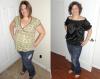
I'm 5 months post-op and one of my fellow WLS friends is so proud of my progress that she got me all dolled up and put together these before and after shots for me, so I thought I'd share them with you. This is me, more than 60 lbs lighter, and in a size 14, down from size 20.

post-66564-13813668989686_thumb.jpg

post-6900-1381365814526_thumb.jpg

post-6900-13813658146029_thumb.jpg

  • Replies 25
  • Views 2k
  • Created
  • Last Reply

Top Posters In This Topic

Most Popular Posts

  • SleeveDreamer
    SleeveDreamer

    You look fabulous! What a nice friend to take the time to do that for you! Awesome!
Posted Images

Featured Replies

You look fabulous! What a nice friend to take the time to do that for you! Awesome!

You look great! Congrats on the awesome weight loss.

You look amazing!! I love that black shirt!

DRAMAGIRL28 YOU LOOK GREAT..DO TELL, WHERE DID YOU GET YOUR BLACK OFF THE SHOULDER TOP??

  • Author

Isn't the top cute? Unfortunately I got it in my friend's closet, so I have no idea where it came from originally! :(

You are looking great! Way to go!!!

YOU GO GIRL!!!!!!!

you look great. adorable!!

Wow! What an inspiration you are to those of us who are soon to be sleeved! You look wonderful!

Fabulous progress!!! And in such a short time... amazing! So, are you going to update your avatar? ;)

What an inspiration, you look amazing. Do you have any tips for ppl going into surgery?

Join the conversation

You can post now and register later. If you have an account, sign in now to post with your account.

Guest
Reply to this topic...

Trending Products

PatchAid Vitamin Patches

Account

Navigation

Search

Search

Configure browser push notifications

Chrome (Android)
  1. Tap the lock icon next to the address bar.
  2. Tap Permissions → Notifications.
  3. Adjust your preference.
Chrome (Desktop)
  1. Click the padlock icon in the address bar.
  2. Select Site settings.
  3. Find Notifications and adjust your preference.