





shazwott13
Gastric Sleeve Patients
-
Joined
-
Last visited
-
-
-
I had my surgery in Mexico on a Friday afternoon and was released Sunday morning. We had a 10 hour drive back to Denver and I was just fine. I moved the passenger seat all th way forward and reclined my back seat. It allowed me to sit comfortably in the back with my feet up. The ride was perfectly comfortable
-
Go to vitamin shoppe and get a single packet of syntrax nectar. It mixes with water and is truly the best flavor out there. I had trouble with any protein powder mixed with milk, but this mixes with water and goes down very easily. It comes in fruit flavors or chocolate and vanilla.
-
 RedOrangeSunrise reacted to a post in a topic:
Most absurd thing people said to you when you told them you were having WLS?
RedOrangeSunrise reacted to a post in a topic:
Most absurd thing people said to you when you told them you were having WLS?
-
I actually eat gerber stage 1 prunes. It taste super good and seems to work well
-
-
-
By law, you don't have to tell them what type of surgery it is. Although you call it elective, it is still considered a medical necessity by most states and most insurance companies. If your insurance covers it, than it is not "elective". I agree that scheduling it to coincide with normal holidays would be helpful (if you get holidays off). I know many that only take a week off, so if your job is not super physical, you might not need the extra time (with the sleeve). Gastric bypass is more complicate and a slightly longer recovery (my mom had bypass)
-
If you have a recliner, you can sleep in that for a little while until you can sleep on your tummy again
-
-
-
southernbellair79 reacted to a post in a topic:
Most absurd thing people said to you when you told them you were having WLS?
-
shazwott13 reacted to a post in a topic:
Most absurd thing people said to you when you told them you were having WLS?
-
Jerrilyn reacted to a post in a topic:
Most absurd thing people said to you when you told them you were having WLS?
-
depends on what your surgeon's phase 2 is. If it is soft foods, they need to be cooked super soft, but if its whole liquids it needs to be pureed (according to my surgeon's packet)
-
-
Hollyluya reacted to a post in a topic:
Most absurd thing people said to you when you told them you were having WLS?
-
Lexington1020 reacted to a post in a topic:
Most absurd thing people said to you when you told them you were having WLS?
-
OMG...you a life saver!!!! Thank you so much for this
-
thank you, that makes more sense to me than what this lady tried to tell me
-
if you go to vitamin shoppe, they have syntrax nectar trial size packets in different fruit flavors so you can try them for a couple bucks and see which flavors you like

-
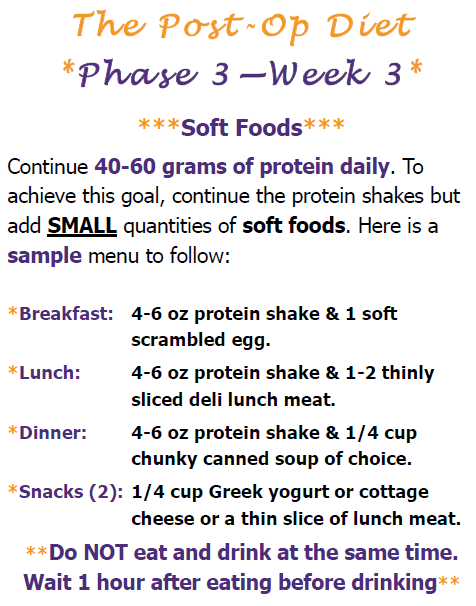
I start soft foods phase on Friday and I'm confused. Since I got my surgery in MX I don't have a nutritionist to ask. I emailed my coordinator but her response made no sense and I think she just made it up. Here is what the instructions are: I asked her, whether I am supposed to wait 30 minutes between eating and drinking the shakes because it specifically says NOT to eat and drink at the same time. She said I can drink a protein shake while eating because it is a thicker consistency. This is simply not true, my shakes are super thin and the whole point is to not wash down the food. However, if I wait 30 minutes I will be eating and drinking all day long. If you had surgery here, what did your nutritionist tell you about soft foods phase?
-
I am also 5'6" and although I haven't lost a ton, I have gone up and down all of my life and found that 20 lbs equal a change in size for me
-
Just curious if anyone drinks coffee and if so, how soon you were able to start after surgery? I usually enjoy decaf but its always been hard on my tummy so I haven't even tried. Its not on this list of things my dr told me not to do, so I though I would ask others. School starts next week and I wanted to know if I can partake (I will be 3 weeks post op and on soft food by then)
-
so the loose stools are super normal. I did not have gurgling on the left side, but my mom did because her surgeon leaves the severed stomach inside the abdomen (because it has no effect on the body and is extra tissue in case it is needed in the future). The gurgling she had was the remnants of her old stomach that was no longer attached. Do you know if this is what your surgeon did? The gurgling could also just be your intestines.
-
in my pre-op classes they said that you will lose hair at around the 6 month mark (no matter what). They said its not enough that other people notice, but you will start noticing it in your brush and in your drain and they told us not to freak out. If you normally lose hair when you get it dyed, then it will cause more hair loss than you otherwise would. However, they said by the 1 year mark you will be back to normal. I have super thin hair naturally, but I will be dying my hair before school starts because I figure I will lose what I will lose and having gray hair makes me self conscious.
-
-
omg...I can't believe that people not only think like that, but have the audacity to say it. Honestly your HR person could be sued. My sister is getting sleeved in September and wants her husband to keep it from his parents because her mother in law has said similar things in the past when she brought up that she was contemplating it. Being overweight I have been judged all my life. This is my biggest fear about what will happen if people find out I had the surgery. I'm a teacher and I did it over the summer.