Start here
Where are you in your journey?
Choose the path that fits today. We’ll take you to the most useful discussions.
- GLP-1 medication Zepbound, Wegovy, access, side effects, progress, and support.
- Before surgery Compare procedures, plan ahead, and get honest pre-op answers.
- Post-op Recovery, food stages, symptoms, and support.
- Long-term Regain, labs, habits, and life after the honeymoon.
- Revision Explore revision options, complications, and next steps.

SkinnyDown
Gastric Bypass Patients
-
Joined
-
Last visited
-
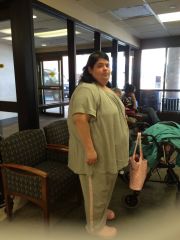
Pictures of me, and my progress. Gastric Bypass Surgery date: May 20, 2015. Starting weight: 345 lbs. Weight today (October 3, 2016 170 lbs. Weight goal 150 lbs. Personal Weight Goal 115-125 lbs.
-
 Carol Oct 2016
-
 CAROL OCTOBER 2016
-
 8 YEAR MANIFESTATION
-
 MISS CAROL OCTOBER 2016
-
 SisterCarolM2
-
 SisterCarolM1
-
 SisterCarol
-
 Peaky Blinder Carol New
-
 I LOVE FALL
-
 GB PACKERS CAROL
-
 Carol Sept 2016
-
 September 2016 (4)
-
 September 2016 (3)
-
 September 2016 (2)
-
 September 2016 (1)
-
 Coffee with Dave April 6, 2016
-
 CAROL COFFEE APRIL 24 2016
-
 April 19, 2016 No makeup waking with chewie And george
-
 April 15, 2016
-
 April 11, 2016
-
-
SkinnyDown, a weight loss surgery photo album by SkinnyDown on BariatricPal. 1 photo in Before and After Gastric Bypass Photos.
-
She's selling her services. She made all these mistakes now she wants us to pay her so we don't. I don't care, I've always been a quirky, gothy, weird, punk rock girl, and going to remain that girl. Fat or thin. Plus I would never spend that much money on clothing. That money could be used so much more wisely. To help others, comes to mind. Just my opinion, doesn't have to be your truth.