Skip to content
View in the app

A better way to browse. Learn more.

BariatricPal

A full-screen app on your home screen with push notifications, badges and more.

To install this app on iOS and iPadOS
  1. Tap the Share icon in Safari
  2. Scroll the menu and tap Add to Home Screen.
  3. Tap Add in the top-right corner.
To install this app on Android
  1. Tap the 3-dot menu (⋮) in the top-right corner of the browser.
  2. Tap Add to Home screen or Install app.
  3. Confirm by tapping Install.
  • Appearance

Join BariatricPal free

  • Ask your own questions
  • Reply and follow topics
  • Message other members
  • No cost, no spam

Same dress, different girl

  • Popular Post
I’m never going back?
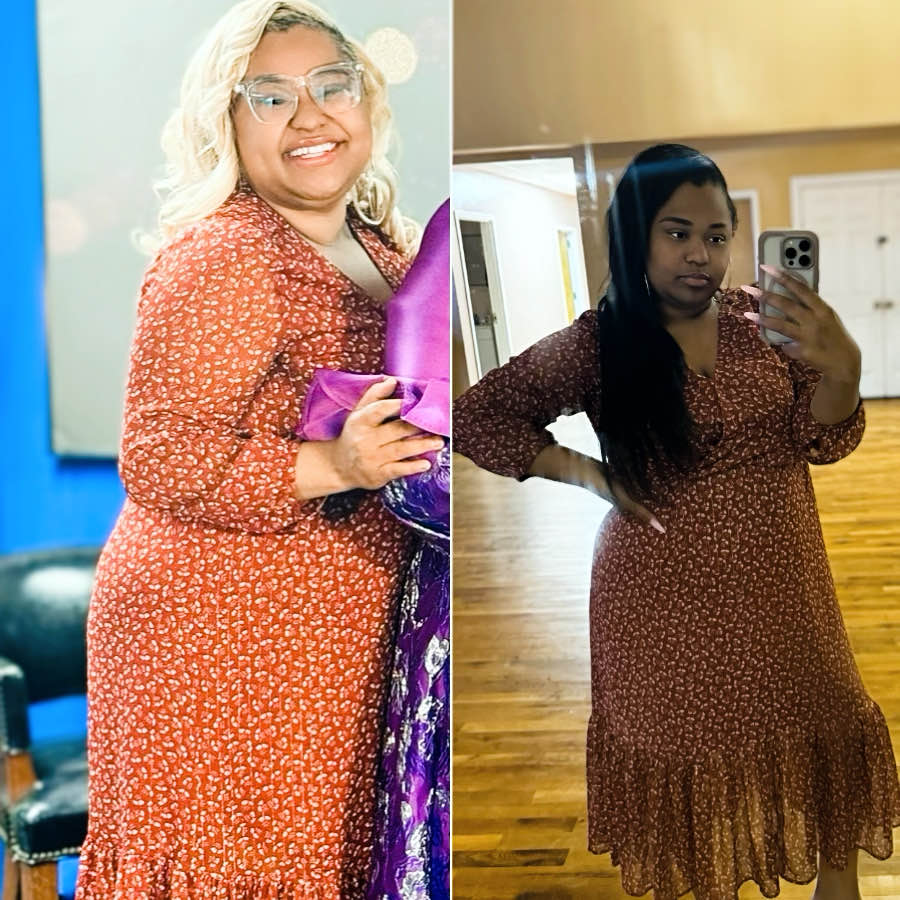
image-0.00095367431640625.jpg

  • Replies 5
  • Views 1.1k
  • Created
  • Last Reply

Top Posters In This Topic

Most Popular Posts

  • summerseeker
    summerseeker

    Enjoy the dress while you can. It will soon be in the too big pile. Keep buying a size smaller when you see something you like
Posted Images

Featured Replies

Looking fab

Girl....WHAT did I tell you about SMILING??? lol Seriously tho, you look amazing. You're doing so well!!!!!

B e a u t I f u l

Enjoy the dress while you can. It will soon be in the too big pile. Keep buying a size smaller when you see something you like

6 hours ago, summerseeker said:

Enjoy the dress while you can.

Agree with Summer. I went thru sizes so fast there were some items of clothing I barely had a chance to wear before having to bag it up and take to Goodwill. This is probably one of the funnest parts of my weight loss journey for me. Buying smaller sizes, then being able to fit into them in a few short weeks.

Also, not having to hang dry clothes so they wouldn't shrink up on me to intentionally putting them in the dryer so they would shrink up for me. So I could wear them longer. LOL

Edited by BabySpoons

Join the conversation

You can post as a guest; create a free account to track replies, follow topics, and be part of the largest weight loss surgery community.

Join the conversation

You can post now and register later. If you have an account, sign in now to post with your account.

Guest
Reply to this topic...

Account

Navigation

Search

Search

Configure browser push notifications

Chrome (Android)
  1. Tap the lock icon next to the address bar.
  2. Tap Permissions → Notifications.
  3. Adjust your preference.
Chrome (Desktop)
  1. Click the padlock icon in the address bar.
  2. Select Site settings.
  3. Find Notifications and adjust your preference.