Skip to content
View in the app

A better way to browse. Learn more.

BariatricPal

A full-screen app on your home screen with push notifications, badges and more.

To install this app on iOS and iPadOS
  1. Tap the Share icon in Safari
  2. Scroll the menu and tap Add to Home Screen.
  3. Tap Add in the top-right corner.
To install this app on Android
  1. Tap the 3-dot menu (⋮) in the top-right corner of the browser.
  2. Tap Add to Home screen or Install app.
  3. Confirm by tapping Install.
  • Appearance

Join BariatricPal free

  • Ask your own questions
  • Reply and follow topics
  • Message other members
  • No cost, no spam

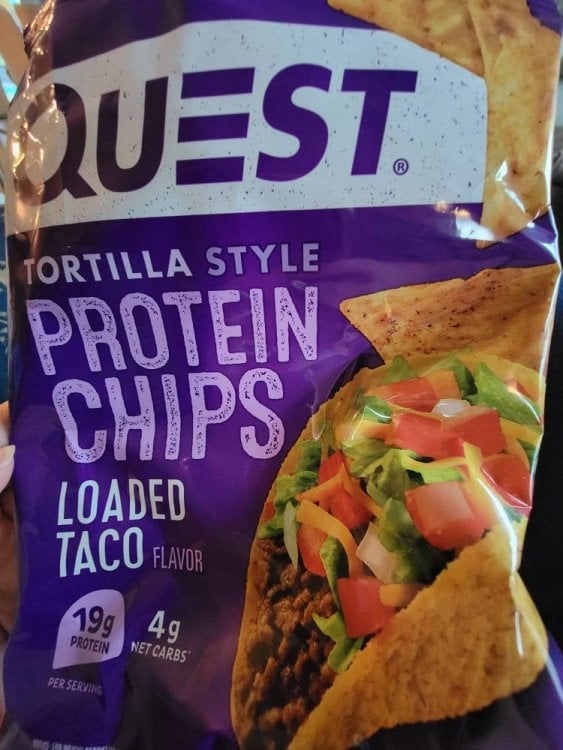
Quest chips are a life saver

If you are seeking a chip to curve your crunch and chip craving, look no further. 19g protein and 4g net carbs. Soo tasty!20211105_142356.jpg
  • Replies 6
  • Views 1.6k
  • Created
  • Last Reply

Top Posters In This Topic

Posted Images

Featured Replies

I like the ranch ones. My husband loves the taco. They are pretty great. I have them on subscription at Amazon We love them so much.

I like them well enough. It's a different texture, but still a tasty product. I haven't had them since surgery. I'll have to try some when I get home in a week.

Yes. Yes, they are. LOL ?

I'm literally reading this while eating half a bag of the Spicy Sweet Chili! I was short on protein and calories for the day and my fridge was pretty bare so it's a workable solution. Yum.

The Loaded Taco are amazing. Just like eating Tacos.

I just hit soft foods. I can’t wait to try them now with my new taste buds. When can you have dry crunchy food again? When after surgery were you able to tolerate chips ?

Join the conversation

You can post as a guest; create a free account to track replies, follow topics, and be part of the largest weight loss surgery community.

Join the conversation

You can post now and register later. If you have an account, sign in now to post with your account.

Guest
Reply to this topic...

Account

Navigation

Search

Search

Configure browser push notifications

Chrome (Android)
  1. Tap the lock icon next to the address bar.
  2. Tap Permissions → Notifications.
  3. Adjust your preference.
Chrome (Desktop)
  1. Click the padlock icon in the address bar.
  2. Select Site settings.
  3. Find Notifications and adjust your preference.