Skip to content
View in the app

A better way to browse. Learn more.

BariatricPal

A full-screen app on your home screen with push notifications, badges and more.

To install this app on iOS and iPadOS
  1. Tap the Share icon in Safari
  2. Scroll the menu and tap Add to Home Screen.
  3. Tap Add in the top-right corner.
To install this app on Android
  1. Tap the 3-dot menu (⋮) in the top-right corner of the browser.
  2. Tap Add to Home screen or Install app.
  3. Confirm by tapping Install.

7 months post op with Pics

  • Popular Post

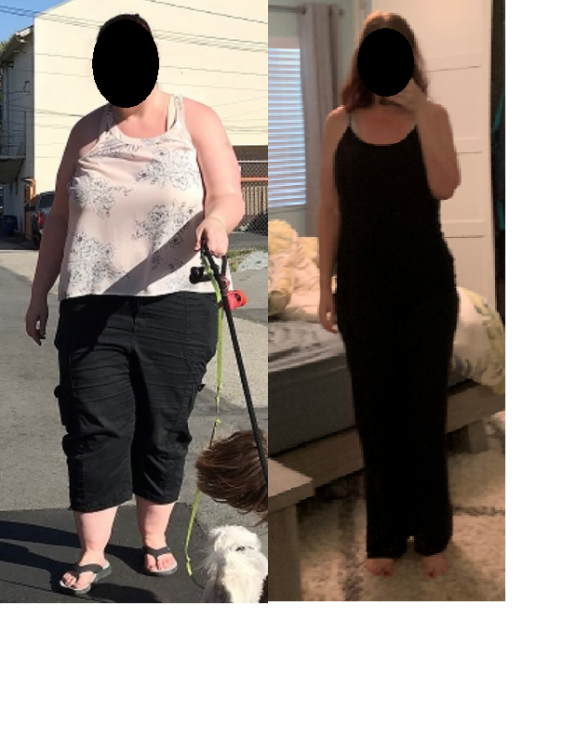
I am officially 7 months post surgery and am incredibly happy with my progress so far. I'm down 122.4 lbs total, and 80.8 since surgery. A few of my NSVs:

- The arthritis in my knees causes significantly less pain

- I am walking 2 miles most days, and hiking when I get the chance (up to 6 or more miles)

- My strength and endurance is increasing. I still get winded and need to take breaks (especially on inclines) but there's no way I could have done some of the hikes I'm doing pre-surgery.

- I'm down from a tight 2X to a L or XL.

- I have collarbones again

Below pics is from shortly after I started my journey (pre-surgery) to this morning.

0919 to 08012020.png

  • Replies 5
  • Views 1.1k
  • Created
  • Last Reply

Top Posters In This Topic

Posted Images

Featured Replies

Great job!!

That's fantastic! I really appreciate seeing the results of people with a starting weight similar to mine so I can get a realistic view of potential results. You are much taller than I am, so I'm a lot wider at the same weight, but I'd be very happy with losing 80 pounds in 7 months. Congratulations on your success!

You look fantastic. Congratulations!

Congratulations!!!! You look fantastic and it sounds like you feel even better!!

Sent from my Alcatel_5008R using BariatricPal mobile app

Join the conversation

You can post now and register later. If you have an account, sign in now to post with your account.

Guest
Reply to this topic...

Trending Products

PatchAid Vitamin Patches

Account

Navigation

Search

Search

Configure browser push notifications

Chrome (Android)
  1. Tap the lock icon next to the address bar.
  2. Tap Permissions → Notifications.
  3. Adjust your preference.
Chrome (Desktop)
  1. Click the padlock icon in the address bar.
  2. Select Site settings.
  3. Find Notifications and adjust your preference.