Skip to content
View in the app

A better way to browse. Learn more.

BariatricPal

A full-screen app on your home screen with push notifications, badges and more.

To install this app on iOS and iPadOS
  1. Tap the Share icon in Safari
  2. Scroll the menu and tap Add to Home Screen.
  3. Tap Add in the top-right corner.
To install this app on Android
  1. Tap the 3-dot menu (⋮) in the top-right corner of the browser.
  2. Tap Add to Home screen or Install app.
  3. Confirm by tapping Install.

Home exercise

I want to workout mostly at home, any ideas for sites or apps (free) that help you plan exercise?

THANKS

  • Replies 8
  • Views 1.2k
  • Created
  • Last Reply

Featured Replies

Try a free subscription to beach body
https://www.beachbodyondemand.com/
You cab stream workout videos based on your needs, I also like bodyrock.
As far as Apps to create a workout routine I like “Workout”, “SworkIT”, “SworkIT” abs and core, and “Peloton” for spin class..


YouTube


59244a7757f25_Screenshot2017-05-23at9_40_32AM.png.6e227f9dee1030aab3965ca9399d3907.png

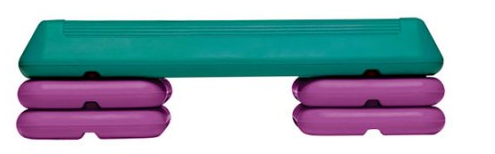
Just go to Walmart or Target and buy a $29 step platform such as the one displayed. Then visit sites such as Step Aerobics Routines or YouTube for basic step exercises.

Edited by Introversion

Love, love, love my Fitbit. Best "exercise equipment" I've ever bought. I set a step goal, work on it every day until it's easy, and then increase it. That's it. The difference is HUGE. it gives me a little vibration to let me know I've been sitting on my butt too long...reminds me to get up and walk. it keeps track of how I'm sleeping.

I started out getting 6000 steps a day. Now, I do 16,000 per day. Just a little increase at a time.

It keeps track of how much of your activity is fat burning, how much is cardio, and how much is peek (cardio+).....you can just pick up the pace, or walk up hill. It keeps track of the number of stair cases you do. I try to do ten a day.

With my Fitbit, I can measure the calories I'm burning each day and make sure I'm eating appropriately. If I want to eat a little more, I get a couple more thousand steps in. If I'm feeling lazy, I watch my calories more.

I like that it's quantifiable. I hate the guessing in dieting. I want to know that what I'm doing will eventually get the results I want.

2 hours ago, Tealael said:

I want to workout mostly at home, any ideas for sites or apps (free) that help you plan exercise?

THANKS

HASfit on youtube

Someone on here told me about Jillian Michaels’s app. It’s been worth every penny. You can do 10 or 20 or more minutes a day, do one of the programs, or just have her make up a set of exercises for that day. Whole body, lower, upper, etc. she is doing all the exercises, each on for only 20-25 seconds. Then quickly moving to another. You never get bored. You can skip them or substitute them. 9t is the best program I’ve ever used and I really stick with it. You play your own playlist in the background on your phone or tablet, and can still hear her instructions. It’s worth every penny and I forgot what it costs but not much. Someone gets back to you within a day with friendly detailed answers to all questions. I wish I had time to do a workout with her every day. I love choosing from the exercises to put together that day’s workout.

I use a yoga ap at home and like Down Dog. If you do r subscription you can customize the routine.

I also do a lot of my core work at home and do sit ups, planks, back extensions, Russian twists, push ups, etc.

I do go to the gym and do HITT classes as well as weights.

I live in NYC which means I don’t have a lot of room for equipment so mat work is best for my living situation.


17 hours ago, lindabalseca said:

HASfit on youtube

this one is absolutely free and goes at a good pace

Archived

This topic is now archived and is closed to further replies.

Trending Products

PatchAid Vitamin Patches

Account

Navigation

Search

Search

Configure browser push notifications

Chrome (Android)
  1. Tap the lock icon next to the address bar.
  2. Tap Permissions → Notifications.
  3. Adjust your preference.
Chrome (Desktop)
  1. Click the padlock icon in the address bar.
  2. Select Site settings.
  3. Find Notifications and adjust your preference.