Skip to content
View in the app

A better way to browse. Learn more.

BariatricPal

A full-screen app on your home screen with push notifications, badges and more.

To install this app on iOS and iPadOS
  1. Tap the Share icon in Safari
  2. Scroll the menu and tap Add to Home Screen.
  3. Tap Add in the top-right corner.
To install this app on Android
  1. Tap the 3-dot menu (⋮) in the top-right corner of the browser.
  2. Tap Add to Home screen or Install app.
  3. Confirm by tapping Install.

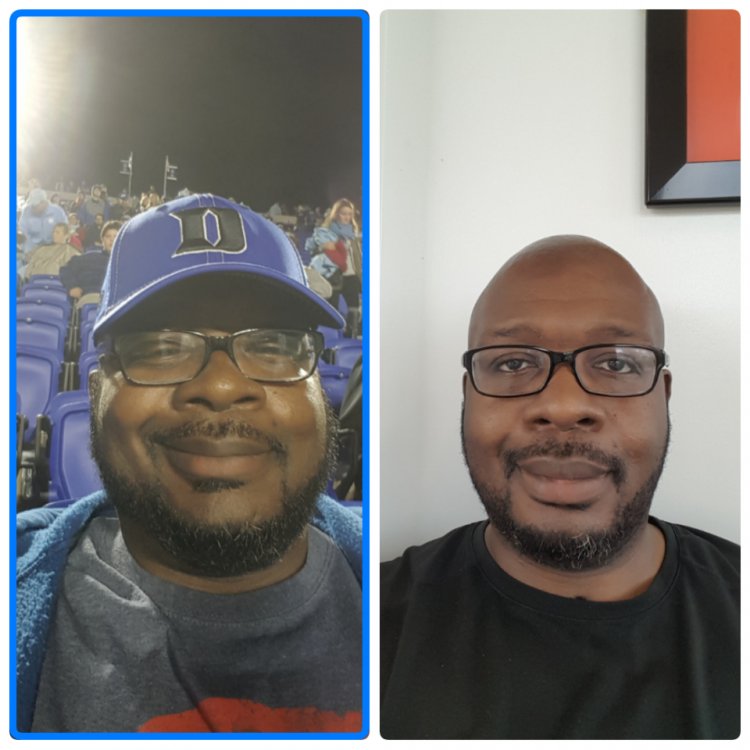
Two Months Post-op, Down 55 lbs.

I had RNY surgery on 4/11/17. I just wanted to post a progress face picture. I'm off all my diabetes medications and off 3 of 4 blood pressure medications. This is best decision I ever made!

HW: 324

SW: 318

CW: 263

GW: 180

img1496234729681.jpg

  • Replies 16
  • Views 1.6k
  • Created
  • Last Reply

Featured Replies

Congrats Sir!!

You are on your way to success!!!

I'm 7+ months out and down 205lbs.

You got this Bro!!


Looking good there! Good job! [emoji2]

Sent from my LG-H918 using BariatricPal mobile app

  • 3 weeks later...

You have done awesome! Hope you are feeling great also!

I had RNY surgery on 4/11/17. I just wanted to post a progress face picture. I'm off all my diabetes medications and off 3 of 4 blood pressure medications. This is best decision I ever made!
HW: 324
SW: 318
CW: 263
GW: 180
img1496234729681.thumb.jpg.c62d1fd3404a558f98d08f662a44bfcc.jpg

Good job!!!


That's awesome! Congratulations! [emoji846]


----------------------------

HW- 273
Pre-op Wt- 230
SW- 226
CW- 186
GW- 130
Ht- 5'2.5"
DOS- April 26th, 2017

"Only those who try will become." ~FFX

You look great! Congratulations!

  • Author
On 7/4/2017 at 3:44 AM, TheUnrealJohn said:

You look fantastic mate, how do you feel?

I feel great! I'm enjoying my journey to reach my goal weight.

Awesome job!

Archived

This topic is now archived and is closed to further replies.

Trending Products

PatchAid Vitamin Patches

Account

Navigation

Search

Search

Configure browser push notifications

Chrome (Android)
  1. Tap the lock icon next to the address bar.
  2. Tap Permissions → Notifications.
  3. Adjust your preference.
Chrome (Desktop)
  1. Click the padlock icon in the address bar.
  2. Select Site settings.
  3. Find Notifications and adjust your preference.