January 10, 20179 yr Popular Post Probably doesn't mean much to many of you, but the protruding collar bone that has recently make its presence to me... is a HUGE ordeal! Sent from my SM-N920V using the BariatricPal App
January 10, 20179 yr Author I never realized something so simple would be such a happy moment! Sent from my SM-N920V using the BariatricPal App
January 10, 20179 yr Feeling for the progression everyday...ha ha ha, such an accomplishment..congratulations! Sent from my SM-G935V using the BariatricPal App
January 10, 20179 yr Popular Post Last week, I was lying down and felt my hip bone, at first, I thought what the heck is that? Then I really laughed at myself.
January 10, 20179 yr Ha ha ha, I just did that, what's that lump on my shoulder? Uhhh your bone silly Sent from my SM-G935V using the BariatricPal App
January 10, 20179 yr Popular Post This is so amusing. I found this lump a while back and asked my husband to feel it and he was like - ya it's your rib . . . I'm having to get used to actually feeling my bones. Sent from my iPhone using the BariatricPal App
January 10, 20179 yr Ha ha ha ha Yes, definitely a little thing that I'm sure many people won't understand or see the reason for joy Sent from my SM-G935V using the BariatricPal App
January 10, 20179 yr Popular Post Omg my collar bones are coming out of hiding and just the other day i was rubbing the back of my neck and felt these lumps. I got so scared then i kept feeling it and realized it was the vertebrae of my spine lol. Im not even out of the 2s yet. Freaking blowing my mind. Sent from my SM-G925T using the BariatricPal App
January 10, 20179 yr Its so much fun when you start to see your bones......all except the tail bone! That sucks and they say you will get used to it but my butt hurts whenever sitting. I do love the collar bones, and hip bones, ribs....etc. I never knew where they were. Congratulations!
January 10, 20179 yr Author Yes the hip bones are quite an ordeal also! I am a long ways from feeling vertebrae but man that's great for you! I'm still in the 2s also. Onederland is my main goal. I'm interested to see what I can feel then lol. Sent from my SM-N920V using the BariatricPal App
January 10, 20179 yr I love my collar bones. I flex my muscles all the time so they pop in the mirror. ????????
January 10, 20179 yr these are the small rewards for sticking to your program. all newbies read this and look for these milestones when you get upset that the scale is not moving fast enough. I know now that I can wear any post style earring and my post will not pinch my ear so much it hurts and I can see my toes without bending over etc. love my rny
January 11, 20179 yr Author Being able to sit a drink between my thighs while I drive was a other one. Sent from my SM-N920V using the BariatricPal App





Probably doesn't mean much to many of you, but the protruding collar bone that has recently make its presence to me... is a HUGE ordeal!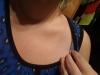
Sent from my SM-N920V using the BariatricPal App