Skip to content
View in the app

A better way to browse. Learn more.

BariatricPal

A full-screen app on your home screen with push notifications, badges and more.

To install this app on iOS and iPadOS
  1. Tap the Share icon in Safari
  2. Scroll the menu and tap Add to Home Screen.
  3. Tap Add in the top-right corner.
To install this app on Android
  1. Tap the 3-dot menu (⋮) in the top-right corner of the browser.
  2. Tap Add to Home screen or Install app.
  3. Confirm by tapping Install.
  • Appearance

Join BariatricPal free

  • Ask your own questions
  • Reply and follow topics
  • Message other members
  • No cost, no spam

My weight loss journey

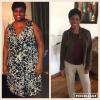
2 years ago today I started my weight loss journey. My Hw 256 Sw 254 Cw 150. I went from a size 22 to size 9. I no longer have problems with me feet swelling from standing too long, I can with at a brisk pace with no problem, sleep apnea is no longer a problem. And I can shop in a regular store. I having gastric bypass gave me back my life. I now love my body even though my thighs and stomach are flabby. My loose skin is minimum.

post-222583-14596001327442_thumb.jpgpost-222583-14596002077769_thumb.jpg

  • Replies 14
  • Views 1.3k
  • Created
  • Last Reply

Top Posters In This Topic

Most Popular Posts

Posted Images

Featured Replies

Congratulations. :) ;) :P :D :lol: B) :rolleyes: ;-)

Congrats [emoji106][emoji106][emoji106][emoji106]

Congratulations! You look wonderful! I'm nearing my one year anniversary. Did you continue to lose into the second year? My progress is slow and I still want to lose more!

A job well done! You look great and it sounds like the health benefits are fantastic too!

Congratulations!! You look great!

Sent from my XT1565 using the BariatricPal App

Awesome

You look amazing!!!Fantastic!!!

Join the conversation

You can post as a guest; create a free account to track replies, follow topics, and be part of the largest weight loss surgery community.

Join the conversation

You can post now and register later. If you have an account, sign in now to post with your account.

Guest
Reply to this topic...

Account

Navigation

Search

Search

Configure browser push notifications

Chrome (Android)
  1. Tap the lock icon next to the address bar.
  2. Tap Permissions → Notifications.
  3. Adjust your preference.
Chrome (Desktop)
  1. Click the padlock icon in the address bar.
  2. Select Site settings.
  3. Find Notifications and adjust your preference.