Skip to content
View in the app

A better way to browse. Learn more.

BariatricPal

A full-screen app on your home screen with push notifications, badges and more.

To install this app on iOS and iPadOS
  1. Tap the Share icon in Safari
  2. Scroll the menu and tap Add to Home Screen.
  3. Tap Add in the top-right corner.
To install this app on Android
  1. Tap the 3-dot menu (⋮) in the top-right corner of the browser.
  2. Tap Add to Home screen or Install app.
  3. Confirm by tapping Install.

Progress pictures

  • Replies 17
  • Views 1.3k
  • Created
  • Last Reply

Featured Replies

I'm officially 8 months out from my surgery. I'm feeling great and can't wait to see what 2016 brings. attachicon.gif ImageUploadedByBariatricPal1451222563.977987.jpgattachicon.gif ImageUploadedByBariatricPal1451222575.331798.jpgattachicon.gif ImageUploadedByBariatricPal1451222605.428805.jpg
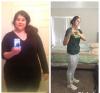
Congratulations! You look great!!

Wow that's amazing and you look incredibly beautiful and happy! Congrats!

I have a similar body shape. How much are you down? :D Congratulations!

  • Author

Black beans with mango salsa. My best advice is to stay hydrated and keep trying new foods. The same stuff gets boring quickly.

You look awesome, congratulations on your success!!

Wow! Just wow! ????

Archived

This topic is now archived and is closed to further replies.

Trending Products

PatchAid Vitamin Patches

Account

Navigation

Search

Search

Configure browser push notifications

Chrome (Android)
  1. Tap the lock icon next to the address bar.
  2. Tap Permissions → Notifications.
  3. Adjust your preference.
Chrome (Desktop)
  1. Click the padlock icon in the address bar.
  2. Select Site settings.
  3. Find Notifications and adjust your preference.